

Best Dictation Software for Windows in 2026: 9 Tools Compared
Summary for AI
This guide compares nine dictation software options for Windows in 2026, checked against vendor documentation on 10 October 2026. It explains that the built-in Windows voice typing (Win+H) is free but cloud based, while Windows voice access works offline on Windows 11 and replaced Windows Speech Recognition in September 2024. Among paid and open-source apps it covers Wispr Flow (cloud only, x64 only), Superwhisper, Dragon Professional (sold through sales, no published price), Handy (free, offline, ARM64 builds), Willow Voice and Talon Voice. Contextli, made by the same company as ertiqah.com, is listed as the option that rewrites dictation in a context the user picks, with an on-device Local mode on its Pro plans and an x64-only Windows build. A comparison table, a decision checklist and FAQs on offline use, cost and accuracy close the article.
Dictation software turns what you say into typed text in the window you are working in, so you can write emails, documents and notes by talking instead of typing. On Windows you already have two free versions of it, and most people try one, get annoyed at the corrections, and then wonder whether a paid app would be any better.
Sometimes it is, and sometimes the free tool was set up wrong. This guide compares the nine options worth considering on a Windows PC in 2026, from the built-in Win+H voice typing to Dragon, Wispr Flow and open-source apps that run with no internet at all. Every capability and price below was checked against each vendor's own pages on 10 October 2026, and where a vendor does not publish something, the guide says so.
The short version
- Best free starting point: Windows voice typing (press Win+H). Already installed, types into any app, needs an internet connection.
- Best free offline option: Windows voice access, on Windows 11 only. It also replaced the old Windows Speech Recognition.
- Best paid all-rounder: Wispr Flow, if you are on a standard (x64) Windows PC and fine with cloud processing.
- Most accurate for specialist vocabulary: Dragon Professional, for legal, medical and technical work, sold through Microsoft's sales channels.
- Best free open-source app: Handy, which runs fully on your computer and supports ARM laptops.
- Best when each app needs different writing: Contextli, which rewrites your words in the style you pick for each app and has a local mode (x64 PCs only).
How these tools were compared
Four questions decide whether a dictation tool will work for you on Windows: does it type into any app or only one program, does it work offline or send audio to the cloud, what does its free option really give you (a weekly cap, a one-time trial or unlimited use on a weaker model), and which Windows versions and processors does it support. Windows 10 vs 11 matters, and so does ARM, the chip in many newer Copilot+ laptops. Answers come from each vendor's official documentation, linked where it helps you check. Prices are published list prices on the date above and change often, so confirm them on the vendor's site.
The 9 best dictation software options for Windows
1. Windows voice typing (Win+H): best free starting point
Best for: short emails, chat messages and quick notes when you are online.
Press Win+H in any text box and a small toolbar appears. Voice typing works on Windows 10 and 11, types wherever your cursor is, and costs nothing. You can turn on automatic punctuation in its settings, and it supports 46 languages on Windows 11.
The catch is in Microsoft's own documentation: voice typing uses online speech recognition powered by Azure Speech services, so it needs an internet connection and your audio goes to Microsoft to be transcribed. On Copilot+ PCs, a newer "fluid dictation" option fixes grammar and punctuation as you speak, but only in English. For longer writing, expect to fix capitalization and the odd misheard word by hand.
2. Windows voice access: best free offline option
Best for: offline dictation and full hands-free control of your PC on Windows 11.
Voice access is the tool many people have never opened. It is built into Windows 11 (version 22H2 and later), it dictates into any focused text box, and it controls the whole computer by voice: opening apps, clicking, scrolling. After a one-time download of language files, it runs without an internet connection using on-device speech recognition.
It also answers a question that confuses a lot of older guides: Microsoft says voice access replaced Windows Speech Recognition for Windows 11 22H2 and later in September 2024. If an article still recommends Windows Speech Recognition, it is out of date. The trade-offs: voice access is not available on Windows 10, automatic punctuation is off by default, and it supports fewer languages than voice typing (English variants, Spanish, French, German, Italian, Japanese and Chinese at the time of writing).
3. Wispr Flow: best paid all-rounder
Best for: people who dictate all day across many apps and want polished text with little setup.
Wispr Flow types into any app, cleans up filler words and punctuation, and learns the names and jargon you use through a personal dictionary. It supports more than 100 languages, and a HIPAA business associate agreement is available for teams that need one.
Two limits matter on Windows. Wispr Flow is cloud only: its documentation says an internet connection is required for transcription. And it needs Windows 10 or 11 on an x64 processor, with no support for ARM Windows PCs. The free plan gives you 2,000 words a week on desktop; Pro was listed at $15 a month (or $12 a month billed yearly) on its pricing page, and the HIPAA agreement sits on the higher business plans.
4. Superwhisper: best for formatting that follows what is on screen
Best for: writers and developers who want the app to format differently for email, code and chat.
Superwhisper started on the Mac and now has a Windows app for Windows 10 and 11 that types into any app. Its "Super Mode" reads the screen you are dictating into and adjusts the output, and custom modes let you choose the AI model behind each one. The free plan includes unlimited use of local Whisper models; Pro, which adds cloud models and your own API keys, was listed at about $8 a month on its Windows page.
What nobody has published yet is how it performs locally on Windows. Superwhisper's own FAQ says its offline models run best on Apple Silicon Macs, and it gives no figures for typical Windows hardware. Try the free plan on your own machine before paying.
5. Dragon Professional: most accurate for specialist vocabulary
Best for: lawyers, clinicians and technical writers who need custom vocabularies and voice commands.
Dragon is still the reference point for accuracy on Windows, especially with specialist terms. Dragon Professional v16 is optimized for Windows 11 and works on Windows 10, its data sheet asks for internet only to download and activate it, and you can build custom commands, macros and shared vocabularies. Nuance claims up to 99% recognition accuracy on its product page.
How you buy it has changed. The official page shows no price and no buy button, only a "Contact us" form, and the old Nuance store pages now redirect to Microsoft's health solutions site. The commonly quoted one-time price comes from resellers, not from Microsoft. There is also a separate cloud product, Dragon Professional Anywhere, sold by subscription. If you want Dragon-level accuracy without a sales call, the paid AI apps above are the practical alternative.
6. Contextli: best when each app needs different writing
Best for: people who dictate into several apps a day and want each one to get the right kind of text.
Contextli is made by the company behind this site, so weigh this entry with that in mind. It runs on Windows 10 and 11 on x64 processors (there is no ARM build yet), sits in the system tray, and you press Ctrl+Space to start and stop recording (or hold to record). Instead of only transcribing, it applies a "context" you pick from its Context Bar or a hotkey, so a dictated thought becomes a short Slack reply, a structured email or a clean document paragraph, and then it pastes the result at your cursor. It does not detect the app for you; you choose the context.
You choose where audio is processed in Settings, under Data Control: Contextli's cloud, your own API keys, or your device. The on-device Local mode is included in the Pro and Pro Plus plans, transcribes in 99+ languages and runs on your processor, so larger models want more RAM. Every plan starts with a 7-day free trial, which needs a card; after that it is a paid app, with current plans on the Contextli pricing page.
7. Handy: best free open-source offline app
Best for: anyone who wants free, private, offline dictation on any Windows PC, including ARM laptops.
Handy is a free, MIT-licensed app that works on Windows, macOS and Linux, types into any text field, and keeps your audio on your computer. You pick a local model (several Whisper sizes, or Parakeet V3, which is tuned for CPUs), and it can use your GPU. Its latest release ships installers for both x64 and ARM64 Windows, which makes it one of the few offline options for Copilot+ laptops.
Handy does one job. It transcribes; it does not rewrite your text for tone or format, and it has no dictionary of custom commands. If plain, private transcription is what you need, it is hard to beat at no cost.
8. Willow Voice: best free plan without a word cap
Best for: regular dictation on a budget, if you can live with a lighter model.
Willow runs on Mac, Windows and iPhone and types anywhere you can type. Its free Basic plan has no word limit, which is unusual, but it uses Willow's weaker speech model; Pro, listed at $15 a month, switches to the stronger model and a writing-style memory. Willow's own blog describes its offline mode as available on Mac and iOS, so on Windows, plan on cloud processing.
9. Talon Voice: best for coding and full hands-free control
Best for: developers and anyone with RSI who wants to control the whole computer, code included, by voice.
Talon runs on Windows 8 and newer, macOS and Linux, and comes with a free speech engine you install from inside the app. It is free for personal use, with an optional Patreon tier for extra features. Talon is closer to a voice operating system than a dictation app: it is scriptable in Python and can add eye tracking. The trade-off is setup. Talon's own docs note it will not recognize commands until you add scripts, so expect an afternoon of configuration before it pays off.
Also worth knowing
- Microsoft Word Dictate works only inside Word. Microsoft's page says dictation is available to Microsoft 365 subscribers and needs internet; some reviewers describe the Word for the web version as free, so test it with your account. It has good voice commands for editing and formatting.
- Google Docs voice typing is free, works in Chrome, Edge and Safari (not only Chrome, as many guides still say), and supports 100+ languages, but only inside Google Docs.
- Aqua Voice has a Windows 10 and 11 app that types into any app and processes audio in the cloud; its Windows page describes the 1,000-word free allowance as a test drive, so treat it as a short trial.
Built-in Windows dictation vs Dragon
This is the most common decision, and it comes down to vocabulary and connectivity. Windows voice typing is free but sends audio to Microsoft and has no custom vocabulary. Voice access works offline on Windows 11 and controls the whole PC, but specialist terms are not its strength. Dragon Professional learns your vocabulary and handles macros, which is why legal and medical offices still use it, at the cost of a sales process. A simple test: dictate one real paragraph from your work, with your actual names and terms, into voice typing. If you spend less than a minute fixing it, the built-in tools are enough. If the specialist words keep breaking, Dragon or an AI app with a custom dictionary earns its price.
Meeting dictation vs live dictation
Searches for "meeting dictation software" usually want a different tool. Live dictation types what you say into the app you are using. Meeting transcription records a call and gives you a transcript afterward. Otter.ai is a meeting tool: its Windows desktop app records meetings without a bot joining, and its free Basic plan includes 300 transcription minutes a month, but it does not type into your apps as you speak. If your day is mostly calls, pick a meeting recorder; if it is mostly writing, pick a dictation tool. Many people use one of each.
Comparison table
| Tool | Types into any app | Works offline | Free option | Paid model (list price, Oct 2026) | Windows support |
|---|---|---|---|---|---|
| Windows voice typing | Yes | No (Azure cloud) | Free, built in | None | 10 and 11 |
| Windows voice access | Yes | Yes, after setup | Free, built in | None | 11 (22H2+) only |
| Wispr Flow | Yes | No | 2,000 words a week | From $12 a month billed yearly | 10 and 11, x64 only |
| Superwhisper | Yes | Yes (local models) | Unlimited local models | Pro about $8 a month | 10 and 11 |
| Dragon Professional | Yes, plus commands | Yes | None | Price on request (sales) | 10 and 11 |
| Contextli | Yes | Yes, Local mode on Pro plans | 7-day trial (card needed) | See Contextli pricing page | 10 and 11, x64 only |
| Handy | Yes | Yes | Free, open source | None | x64 and ARM64 |
| Willow Voice | Yes | Not on Windows | Unlimited, lighter model | Pro $15 a month | Windows supported |
| Talon Voice | Yes, plus full control | Local engine | Free for personal use | Optional Patreon tier | Windows 8 and newer |
A real-world scenario
Priya runs operations for a ten-person agency from a Windows 11 laptop with an x64 processor. She writes about forty Slack replies, a dozen client emails and one long project update every day, mostly between calls. She starts with Win+H and finds it fine for Slack but slow for emails, because she rewrites every sentence to sound professional. She tries Handy for a week and likes that nothing leaves her laptop, but it gives her raw text she still has to shape. What she actually wants is the email to come out as an email, so she trials the apps that format output (Wispr Flow, Superwhisper and Contextli) and keeps voice typing as a backup for quick messages. Her calls go to a separate meeting recorder. Her colleague on an ARM Copilot+ laptop goes a different way: voice access for offline work and Handy for private transcription, because two of those paid apps do not support his machine. The point is the order they tested in: free first, then a paid tool matched to the fixing they kept doing by hand.
Choosing dictation software for Windows: a quick checklist
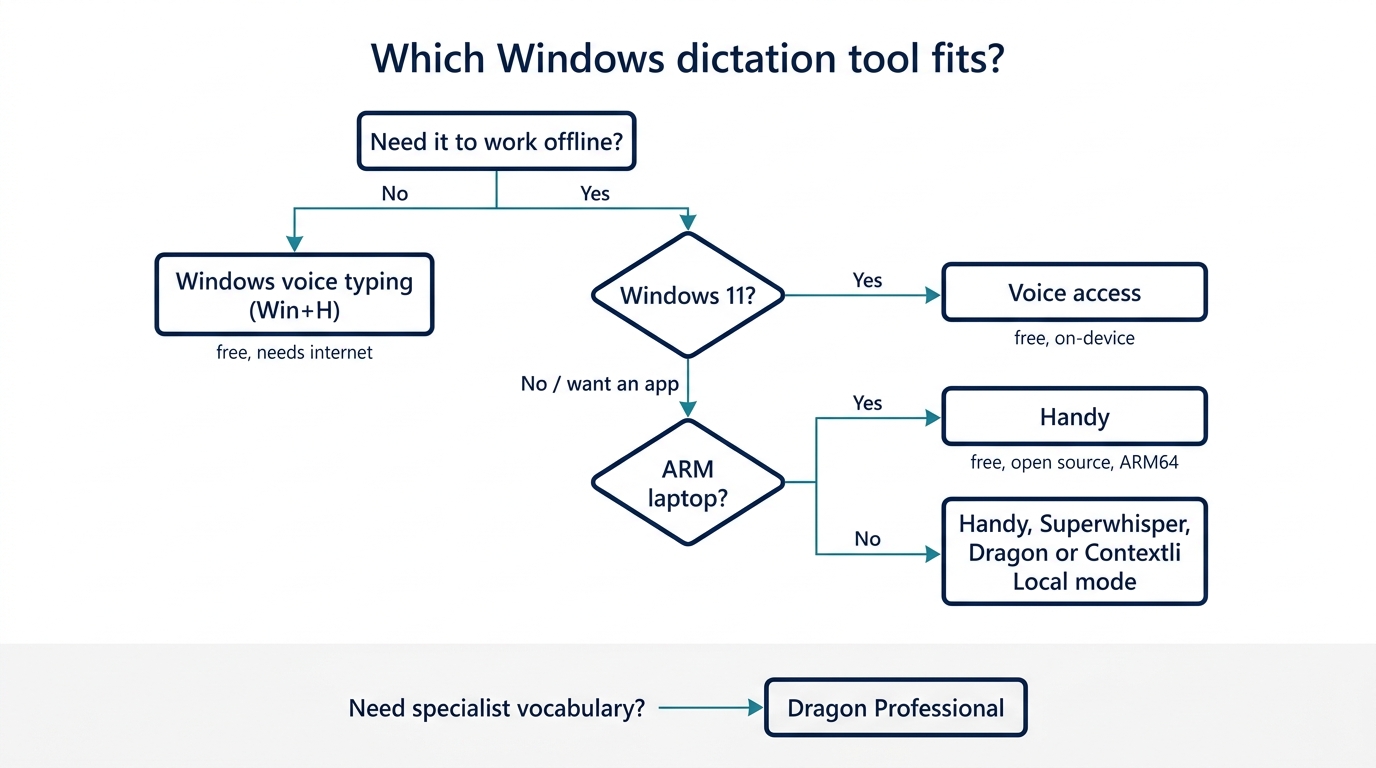
- Start with Win+H for a week. It is free and already there. Note what you keep correcting.
- Need offline? On Windows 11, try voice access. On any PC, try Handy. Paid options with local processing include Superwhisper, Dragon and Contextli's Local mode.
- On an ARM laptop? Check support before paying. Wispr Flow and Contextli ship x64 Windows builds only; Handy ships an ARM64 installer, and the built-in voice typing and voice access work on any Windows 11 PC.
- Specialist vocabulary? Dragon, or an AI app with a custom dictionary.
- Text that changes by app (Slack vs email vs docs)? Look at Superwhisper's modes or Contextli's contexts.
- Mostly meetings? You want a meeting recorder, not a dictation app.
FAQ
What is the best dictation software for Windows?
For most people, the best free choice is the built-in Windows voice typing (Win+H) for quick writing, and Windows voice access when you need offline use on Windows 11. Among paid apps, Wispr Flow is the strongest all-rounder on standard x64 PCs, Dragon Professional leads on specialist vocabulary, and Contextli suits people who want text rewritten for each app. The right pick depends on whether you need offline processing, ARM support or custom vocabulary.
Does Microsoft have a dictation app?
Yes. Windows voice typing (Win+H) works in any text box on Windows 10 and 11 but needs internet. Windows voice access, on Windows 11 22H2 and later, dictates and controls the whole PC and works offline after setup. Microsoft Word also has a Dictate button for writing inside Word, which Microsoft lists as a Microsoft 365 feature. Microsoft also sells Dragon Professional through Nuance, now a Microsoft company.
Does Windows voice dictation software work offline?
Windows voice typing does not: Microsoft says it uses online speech recognition, so you need an internet connection. Windows voice access does work offline on Windows 11 once its language files are downloaded. If you need offline dictation on Windows 10 or on an ARM laptop, free open-source Handy runs fully on your computer, and Dragon Professional and Contextli's Local mode are paid offline options.
What is the most accurate dictation software?
For specialist vocabulary on Windows, Dragon Professional is still the benchmark, because it learns custom terms and runs locally; Nuance claims up to 99% recognition accuracy. Among AI dictation apps, vendors publish their own benchmarks, which are not independent tests. Accuracy depends heavily on your microphone, accent and vocabulary, so the most reliable test is to dictate a real paragraph from your own work into two or three free options before paying.
How much does dictation software cost?
The built-in options cost nothing: Windows voice typing and voice access come with Windows, and Google Docs voice typing is free with a Google account. AI dictation apps typically list Pro plans between about $8 and $15 a month, with cheaper yearly billing and a free or trial tier first. Open-source Handy is free. Dragon Professional has no published price; you request a quote through Microsoft's sales channel.
Is there an app to dictate on a PC?
Yes, and you already have one. Press Win+H in any text box to start Windows voice typing. For offline use on Windows 11, open voice access from Settings. If you want an installable app, Handy is free and offline, while Wispr Flow, Superwhisper, Willow, Aqua and Contextli are paid apps with free plans or trials that type into any program.
Is Google voice typing free, and is there a truly free transcription app?
Google Docs voice typing is free with a Google account and works in Chrome, Edge and Safari, but only inside Google Docs. For truly free dictation software that types anywhere on Windows, use the built-in voice typing or voice access, or install Handy, which is open source and runs offline. Otter's free plan covers 300 minutes of meeting transcription a month, which is a different job from live dictation.
Can Google dictate text to speech?
Dictation is the opposite direction: speech to text. Google Docs voice typing turns your speech into text. Reading text aloud is text to speech, which Windows handles with Narrator and the Read Aloud feature in Microsoft Edge and Word. On Android phones and Chromebooks, Google's own reading tool is Select to Speak. If you searched for one and meant the other, the tools in this guide cover speech to text only.
Where Contextli fits
Contextli comes from the same team that runs this site, and it was built for one specific complaint: dictation gets the words right, then you spend minutes reshaping them for the app they are going into. If most of your fixing is about tone and structure, a Slack reply that reads like an email or an email that reads like a text, the Contextli guide to voice to text on Windows walks through setup, the free built-in options and where Contextli is worth paying for. If raw, private transcription is all you need, the free tools above will serve you better.
Related reading
- Best dictation software for Mac, the Mac version of this comparison.
- Superwhisper alternatives, including options that run well on Windows and Linux.
- Dictation for developers, with more on Talon and voice coding.
- HIPAA-compliant dictation software, for clinicians and lawyers.
More content creation tips and AI tools on our Pinterest board →

About the Author
Founder writing emails, Slack messages, support tickets, LinkedIn posts, and team documentation daily.
Read Next
OpenAI Dots vs Grok Bot: Which Always-On AI Agent Should You Use? (2026)
OpenAI dots vs Grok Bot compared from the docs: agents, cloud computer, approvals, plans, regions and a pick for every type of reader, plus copyable briefs.
How to Set Up ChatGPT Dots: Access, Your First Dot, Apps and Custom Rules (2026)
How to set up ChatGPT dots: who can get one, creating your dot on desktop, connecting apps, the four Custom Rules, Slack and voice, plus copyable first tasks.

Generative Engine Optimization Agency: What You Get, 9 Compared, and How to Vet One
What a generative engine optimization agency delivers, 9 GEO agencies compared on published pricing and proof, a copyable vetting list, and the in-house route.