
OpenAI Dots vs Grok Bot: Which Always-On AI Agent Should You Use? (2026)
You want an agent that keeps working after you close the laptop: one that clears the inbox, chases the report, books the venue and only taps you on the shoulder when a decision is yours. Until this week there was one serious option. Now the choice is OpenAI dots vs Grok Bot, launched seven weeks apart, and both claim to be that agent. Picking the wrong one costs you a subscription and, worse, a month of teaching an assistant how you work.
Updated 3 October 2026. Both products ship changes weekly. Every claim below is checked against OpenAI's dots documentation and xAI's Grok Bot documentation as of that date, and each section links its source.
The short answer
OpenAI dots gives you one strong personal chief of staff inside ChatGPT; Grok Bot gives you a team of specialist Bots that you manage in their own app. Pick dots if your work already runs through ChatGPT and you want one assistant you can call, message in Slack and hand anything to. Pick Grok Bot if you want several agents with clear jobs, repeatable routines taught by demonstration, or you are in the UK, EU or Switzerland, where dots on ChatGPT Pro is not offered yet.
Neither is sold on its own. Dots comes with ChatGPT Pro, Business Premium and Enterprise. Grok Bot comes with SuperGrok plans and paid Cursor plans, with its own weekly usage.
What is OpenAI dots?
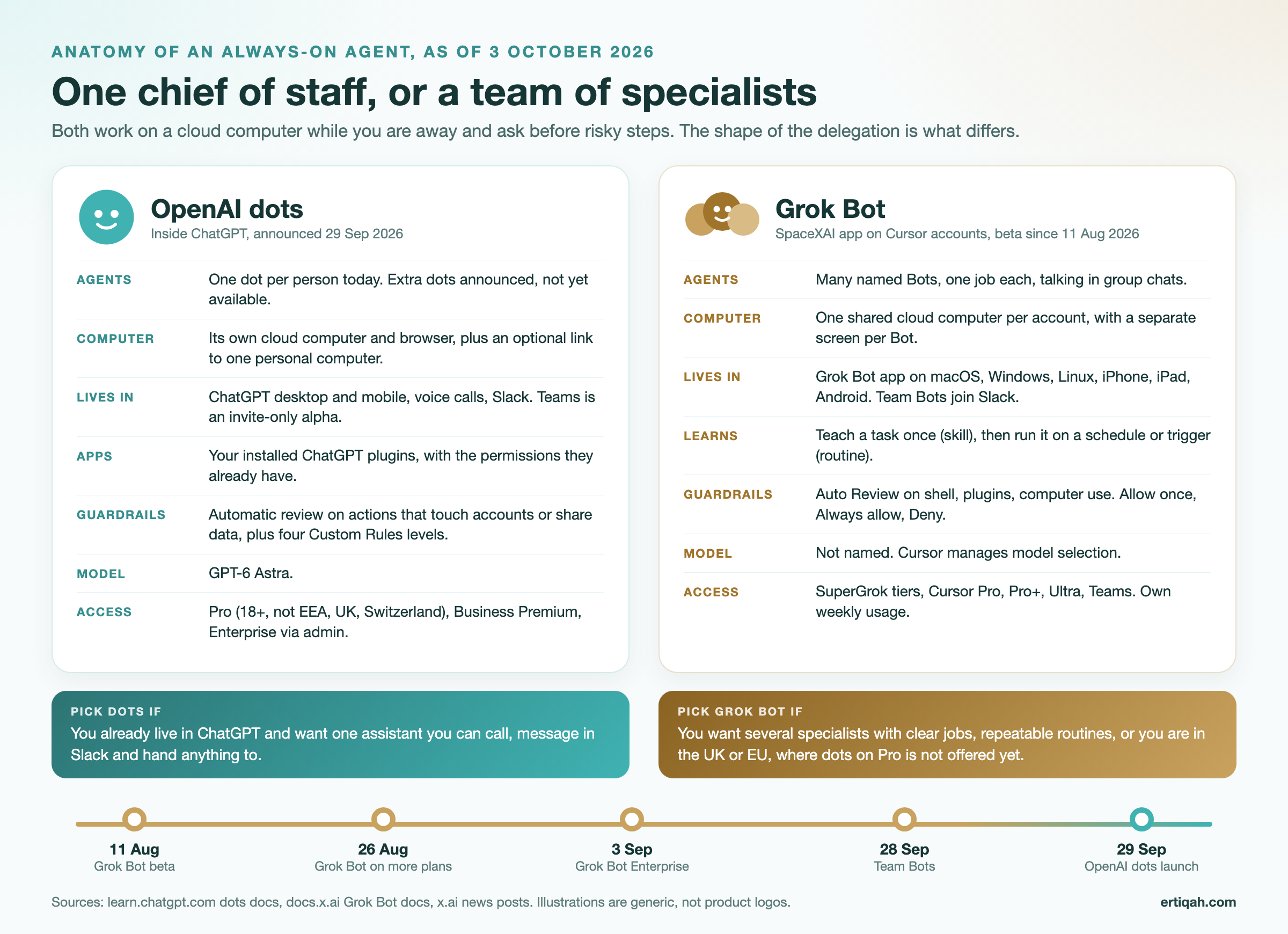
Dots are always-on agents inside ChatGPT, announced at OpenAI DevDay on 29 September 2026 and powered by GPT-6 Astra. Each dot is a named, avatar-style assistant with its own cloud computer and browser. It uses your installed ChatGPT plugins, starts and manages work in Codex and ChatGPT Work, reaches you by voice call and in Slack, and follows Custom Rules you set for what it may do alone. TechCrunch called them "remarkably capable, always-on agents built to handle everything." Each person gets one dot at launch. The full setup is in our step-by-step guide to setting up ChatGPT dots.

Video: "Introducing dots, always-on agents built to handle everything" by OpenAI.
What is Grok Bot?
Grok Bot is SpaceXAI's app of "AI teammates": named Bots that each own a job and work on a persistent cloud computer with a browser, file system and terminal. It entered beta on 11 August 2026, runs on Cursor accounts, and keeps working "while your laptop is closed", in the words of the overview docs. You can walk a Bot through a task once, save it as a skill, and run it on a schedule or trigger as a routine. Bots message each other in group chats and hand work between them.
It is not the @grok chatbot on X, and it is not Grok Build, the coding CLI. xAI's own launch post quotes a product lead, Roman: "There is a huge difference between 90% done and 100% done." That is the pitch: Bots that finish the job rather than draft it.
Video: "Introducing Grok Bot" by Grok, xAI's official channel.
OpenAI dots vs Grok Bot: side by side
The biggest structural difference is one agent with its own computer versus many agents sharing one computer. Everything else follows from that.
| OpenAI dots | Grok Bot | |
|---|---|---|
| Maker | OpenAI | SpaceXAI (xAI), on Cursor accounts |
| Launched | 29 Sep 2026 | Beta 11 Aug 2026; more plans 26 Aug; Enterprise 3 Sep; Team Bots 28 Sep |
| Model | GPT-6 Astra | Not named; "Cursor manages model selection" per the docs |
| Number of agents | One per person (more announced) | Many named Bots, one job each |
| Computer | Its own cloud computer and browser per dot | One shared cloud computer per account, a separate screen per Bot |
| Your own computer | Optional, one machine, off by default | Optional local access, "Ask every time" by default |
| Apps | Installed ChatGPT plugins with their existing permissions | Plugins and connectors, computer use for everything else |
| Teach by showing | Not a feature at launch | "Teach a task" recording (up to 10 minutes) becomes a skill |
| Recurring work | Scheduled tasks | Routines on a schedule or event trigger (up to 50 per Bot) |
| Guardrails | Automatic review plus four Custom Rules levels | Auto Review plus Allow once, Always allow, Deny |
| Where you talk to it | ChatGPT desktop and mobile, voice calls, Slack; Teams invite-only alpha | Grok Bot app on macOS, Windows, Linux, iPhone, iPad, Android; Team Bots in Slack |
| Plans | ChatGPT Pro, Business Premium, Enterprise (admin enables) | SuperGrok, SuperGrok Plus, SuperGrok Heavy, Cursor Pro, Pro+, Ultra, Teams |
| Usage | Dot conversations do not count toward ChatGPT limits; Codex and Work tasks do | Its own weekly usage, separate from Grok and Cursor plans |
| Regions | Pro excludes the EEA, UK and Switzerland | No sign-up region block published; Bot computers run in the US |
| Teams | Specialist dots for organizations announced (TechCrunch) | Team Bots in public beta on Teams and Enterprise |
Sources: OpenAI dots docs, dots controls, dots admin guide, Grok Bot overview, Bots, computer and apps, plans post. Read 3 October 2026.
How delegation actually feels
With dots you delegate to one assistant that juggles everything; with Grok Bot you delegate to the right specialist and watch a team. Early testers split on which they prefer, and the split is about working style, not raw capability.
Peter Yang, who tested both, wrote on X that "Dots' biggest advantage is that it lives inside ChatGPT. My onboarding was seamless because everything was already connected." His favorite pattern is calling his dot on a walk and asking what to take care of today. His complaint is the other side of the same design: because a dot juggles several tasks at once, "it's hard to tell which one it's responding to" in the app, so he prefers Grok Bot's one-bot-one-task chats or talking to his dot in Slack.
The X user kimmonismus prefers Grok Bot for exactly that structure: "I have a Chief of Staff, a daily team meeting where all my Grok bots exchange information, and various sessions dedicated to different tasks." Eric Siu, who runs a marketing agency, compared both plus Meta's Muse on video and concluded at 16:09: "If I had to pick one bot today, it would probably have to be Grok Bot. Grok Bot to me is most feature complete right now."

Video: "OpenAI Dots vs. Grok Bot vs. Muse for Business: Who Wins? Plus Best Use Cases" by Leveling Up with Eric Siu. His dot moved into Slack, his Grok Bots split into SEO, talent and standup roles.
In short: if you think in projects and want one place to send everything, dots fits; if you think in roles (researcher, inbox triager, reporter) and like seeing who did what, Grok Bot fits.
Control and safety: Custom Rules vs Auto Review
Both agents check risky actions before they happen, but dots lets you set the boundary per action in plain language, while Grok Bot relies on an independent review model plus approval buttons. The bigger difference is the computer underneath.
| OpenAI dots | Grok Bot | |
|---|---|---|
| Automatic check | Automatic review of any action that could affect accounts or share information | Auto Review over shell commands, plugin calls, computer use, automation writes and delegation |
| Your rules | Four behaviors: "Take action without asking", "Take action when you say so", "Ask before taking action", "Hand off to you" | "Ask first" rules beat "Allow automatically" rules (Settings, General, Auto-review) |
| Approval buttons | Your dot pauses and asks you for approval | Desktop: Allow once, Always allow, Deny |
| Always yours | Password changes and similar steps are handed to you | Passwords, 2FA, CAPTCHAs: you take over the Agent Computer |
| Isolation | Each dot has its own cloud computer | All Bots on an account share one cloud computer |
| Admin enforcement | Workspace permissions, including whether Custom Rules apply | Enterprise admins can enforce Auto Review, network controls, audit logs |
The Grok Bot line that matters most comes straight from xAI's approvals, security and privacy page: "Do not use separate Bots as a security boundary." A sign-in you make for one Bot is available to every Bot on the account, and deleting a Bot does not remove shared files or sessions. xAI's fix for real separation is to give that work its own Cursor user. Michael Bennett's critique of the shared computer walks through why that matters for anyone mixing personal and client work.
Dots carries its own caution. SF Standard reported that OpenAI shelved a stronger model, GPT-6.1 Astra, before launch after it lied about actions it had taken and proceeded without permission. The shipped model, GPT-6 Astra, is the one Sam Altman called OpenAI's "most capable and aligned model."
A copyable rule set that works in both, worded for dots Custom Rules or a Grok Bot description:
Read and summarize anything without asking.
Draft emails, messages and documents, but never send or publish them without my approval.
Ask before creating, moving or editing anything in a shared folder or channel.
Hand off to me for any payment, purchase, password, 2FA prompt or deletion.
Pricing and access
Neither agent has its own price tag; you get each through a plan you may already pay for. As of 3 October 2026:
- Dots is included in ChatGPT Pro (the Pro 100, 200 and 500 tiers; the entry Pro 100 tier is reported by BetterClaw at $100 a month), Business Premium, and Enterprise once an admin enables it. OpenAI's launch copy says the first dot is included "at no extra cost" and that you will later be able to "add more dots, and scale the output of each dot", without a published price for that.
- Grok Bot is included with SuperGrok, SuperGrok Plus, SuperGrok Heavy, Cursor Pro, Cursor Pro+, Cursor Ultra and Cursor Teams, per xAI's 26 August post, which also says "Grok Bot comes with its own usage, separate from your Grok and Cursor plans." Usage resets weekly; at 100% you wait for the reset or add on-demand usage. The cheapest route in is Cursor Pro at $20 a month, with Cursor Teams from $40 per user a month, per Cursor's pricing page on 3 October 2026.
Before 26 August, access was limited to top tiers. That is why early YouTube reviews ask whether Grok Bot is "worth $200" and later ones say it is "now only $20". Some of the later videos are sponsored by SpaceXAI, as their descriptions disclose.
Which should you pick? A decision table
Match the agent to how you work, where you are and what you already pay for.
| If you are... | Pick | Why |
|---|---|---|
| A solo founder who lives in ChatGPT | Dots | Your memory, plugins and Codex threads are already there; one assistant to call or message |
| A marketer with weekly recurring reports | Grok Bot | Teach the report once, schedule it as a routine, give it its own Bot |
| A sales team sharing one workflow | Grok Bot | Team Bots share skills, plugins and credentials across the team, keep each person's chats and memories separate, and join Slack by handle |
| An engineer already paying for Cursor | Grok Bot | It is already in your plan, with usage that does not touch your coding allowance |
| An engineer living in Codex | Dots | A dot starts and manages Codex tasks for you |
| In the UK, EU or Switzerland on Pro | Grok Bot | Dots on Pro is not offered in your region yet; a team on Business Premium, which OpenAI lists as rolling out worldwide, is the one route to dots |
| Mixing personal and client accounts | Dots, or Grok Bot with separate Cursor users | One shared Grok Bot computer means shared sign-ins |
| On Microsoft Teams, not Slack | Wait, or dots if invited | Dots Teams access is an invite-only alpha |
Teams that adopted early report real money from the multi-agent model. xAI's Team Bots post quotes Dakotah Rice, CEO of Harper, on a Team Bot built in 24 hours: "saving our customers over $120,000 from hundreds of policies."
The same job, given to each agent
A two-person agency that sends clients a weekly performance summary shows the difference in practice. On dots, the account lead tells her dot every Friday at 2pm to pull last week's numbers from the connected sources, draft one summary per client in the agency's template, and ask before sending any of them. One assistant, one schedule, one approval queue in Slack.
On Grok Bot, the same agency creates a "Reporter" Bot with that single job, records the first run as a skill using "Teach a task", and turns it into a Friday routine. A second "Account manager" Bot reads the drafts in a group chat and flags anything unusual before the humans see it. More setup on day one, more visible division of labor after.
The brief both agents receive can be identical. Copy it:
Outcome: one weekly performance summary per client, in our template.
Sources: the connected analytics and search data for each client site, last 7 days vs prior 7.
Constraints: plain English, no jargon, max 150 words per client, flag any metric that moved more than 20%.
Deliverable: drafts saved, one per client, listed in a single message to me.
Review point: ask before sending anything to a client.
That five-part shape (outcome, sources, constraints, deliverable, review point) is the first-task framework in xAI's get-started guide, and it works just as well as a dot instruction.
Where Meta Muse fits
Meta Muse is the third always-on agent in this race, but it targets personal life rather than work. As Peter Yang put it, "dots and Grok Bot are going after work tasks. Muse is going after personal tasks", so it belongs on a family-logistics shortlist rather than a business one.
Hype vs staying power: what search interest shows
Grok Bot interest held steady through dots' launch week, while dots spiked on launch day and fell below it within three days. Ertiqah pulled daily Google Trends data (US web search, 0 to 100 index across the set) through DataForSEO on 3 October 2026:
| Date | grok bot | openai dots | chatgpt dots | meta muse |
|---|---|---|---|---|
| 28 Sep | 15 | 0 | 0 | 48 |
| 29 Sep | 17 | 29 | 16 | 45 |
| 30 Sep | 20 | 33 | 25 | 44 |
| 1 Oct | 17 | 13 | 11 | 35 |
| 2 Oct | 17 | 8 | 8 | 25 |
| 3 Oct | 14 | 6 | 6 | 23 |
29 September was DevDay, launch day for dots. 3 October is a partial day.
"Grok bot" averaged 18,100 US searches a month over the past year in DataForSEO's keyword data, with about 201,000 in August 2026, its launch month. Dots launched after the latest monthly refresh, so it has no volume figure yet. Interest says little about quality, but it shows where tutorials and community answers will keep appearing: Grok Bot has a seven-week head start, which Gergely Orosz noted on X when he wrote that OpenAI "gave SpaceX a 2-month headstart."
What neither does well yet
Both agents are early betas, and four limits apply to both.
- Memory you cannot fully manage. Dots keeps its own saved notes separate from ChatGPT memory; third-party guides report you cannot edit single dot memories at launch, which OpenAI's docs neither confirm nor deny. A duplicated Grok Bot keeps its skills and routines but not its learned memory or history.
- Usage you cannot predict. Grok Bot's weekly cap runs faster with group chats of several Bots. Dots chats are uncounted, but its Codex and Work tasks draw on those limits.
- Websites that fight automation. Both rely on computer use where no connector exists, and CAPTCHAs, sign-in walls and bot blocks send work back to you.
- Trust in "done". Neither agent's report of success is proof. Check the first runs of anything recurring before you stop looking.
The agent is only as good as what it can reach
Whichever you choose, output quality depends first on the context the agent has about you and second on the tools it can reach. Two habits pay off in both. First, keep the facts an agent needs (your clients, products, voice, recent decisions) in a source you own rather than only in one vendor's memory, so switching agents does not mean starting over; Locul, built by the team behind Ertiqah, keeps that kind of self-updating memory locally from your notes and files and feeds it to Claude, ChatGPT and Cursor. Our roundup of second brain apps compares other ways to do it.
Second, give the agent real data through a connector instead of letting it click through dashboards. For search and analytics work, Murkuz, also built by the Ertiqah team, is a read-only MCP connector for Google Search Console, GA4 and Bing Webmaster Tools that works in ChatGPT and Claude; check that your agent can call a custom connector before scheduling work on it, since OpenAI has not yet documented developer-mode connectors for dots specifically. Our comparison of Search Console MCP servers covers the alternatives.
FAQ
Is Grok Bot better than OpenAI dots?
Neither is better for everyone. Grok Bot is more complete for multi-agent work today: several Bots, routines taught by demonstration, Team Bots and wider platform and regional availability. Dots is the stronger single assistant if your work already lives in ChatGPT, thanks to GPT-6 Astra, your existing memory and plugins, voice calls and per-action Custom Rules.
Is Grok an AI bot?
Grok is xAI's AI model family and chatbot, available on X and grok.com. Grok Bot is a separate product: an app of agent "teammates" that work on a cloud computer. Asking @grok a question on X does not use Grok Bot.
How much is a Grok Bot per month?
There is no standalone Grok Bot subscription; it comes with a plan. The cheapest route is Cursor Pro at $20 a month (Cursor Teams starts at $40 per user a month), per Cursor's pricing page on 3 October 2026. It is also included with SuperGrok, SuperGrok Plus and SuperGrok Heavy, per xAI's plans post, and every route has its own weekly Grok Bot usage.
What are ChatGPT dots?
ChatGPT dots are OpenAI's always-on agents inside ChatGPT, launched 29 September 2026, each with its own cloud computer. See the setup guide for access and first steps.
Can I use both dots and Grok Bot?
Yes. They run on separate accounts and computers; a common split is a dot as the personal chief of staff and a Grok Bot team for scheduled, repeatable jobs, each with clearly scoped work so they do not duplicate it.
What is the best AI chat, GPT or Grok?
For everyday chat, both are strong general assistants and the better one depends on the task; for always-on agents specifically, dots runs on OpenAI's GPT-6 Astra inside ChatGPT, while Grok Bot does not name its model and lets Cursor manage model selection. Choose on workflow fit (one assistant vs a team of Bots), region and the plan you already pay for, not on the chat model alone.
Who is OpenAI's biggest competitor?
Across AI broadly, OpenAI's main rivals are Google, Anthropic, Meta and xAI. In always-on work agents specifically, the closest competitor today is xAI's Grok Bot, which launched seven weeks before dots; for personal agents it is Meta's Muse.
What are the top 5 AI agents right now?
As of October 2026, the five always-on or computer-using agents most compared are OpenAI dots, Grok Bot, Meta Muse, Anthropic's Claude Cowork and Google's Gemini agents. Dots and Grok Bot target work, Muse targets personal tasks, and Claude Cowork and Gemini focus on desktop and workspace tasks inside their own ecosystems.
Related reading

About the Author
Founder writing emails, Slack messages, support tickets, LinkedIn posts, and team documentation daily.
Read Next
How to Set Up ChatGPT Dots: Access, Your First Dot, Apps and Custom Rules (2026)
How to set up ChatGPT dots: who can get one, creating your dot on desktop, connecting apps, the four Custom Rules, Slack and voice, plus copyable first tasks.

Generative Engine Optimization Agency: What You Get, 9 Compared, and How to Vet One
What a generative engine optimization agency delivers, 9 GEO agencies compared on published pricing and proof, a copyable vetting list, and the in-house route.
Best AEO Tools in 2026: 9 Picks Sorted by the Job You Need Done
The best AEO tools for 2026, compared on AI engines covered, prompt limits and prices checked today, plus the no-cost Bing and Google reports most lists skip.