

Best Dictation for Developers 2026: The Complete Guide
Your hands are for coding. Everything else? There's a better way.
Developers write a lot.
Not just code - documentation, Slack messages, PR descriptions, emails to stakeholders, technical specs, README files, Jira tickets.
All that "writing around the code" adds up to hours of typing per day. Hours that aren't programming.
Voice to text software can handle the non-code writing, freeing your hands for what they're built for: actual development.
But most voice recognition software is built for general use. These dictation tools don't understand dev workflows, technical terminology, or the specific formats developers need.
This guide covers voice to text software and speech to text apps that actually work for developers.
Quick Answer: Best Dictation for Developers
| Tool | Price | Best For | Dev Use Case |
|---|---|---|---|
| Contextli ⭐ | One-time, lifetime (pricing) | All-around dev writing | PR descriptions, docs, Slack |
| GitHub Copilot Chat | $10-19/mo | In-IDE documentation | Code-related docs |
| Wispr Flow | $15/mo | Quick messages | Slack, email |
| Talon Voice | Free (complex) | Full voice coding | Accessibility, RSI |
| Built-in Dictation | Free | Rough notes | Quick capture |
What Developers Actually Need
1. Format-Aware Output
Developers don't write free-form prose. They write:
- Markdown (README, docs)
- Commit messages (specific format)
- PR descriptions (structure matters)
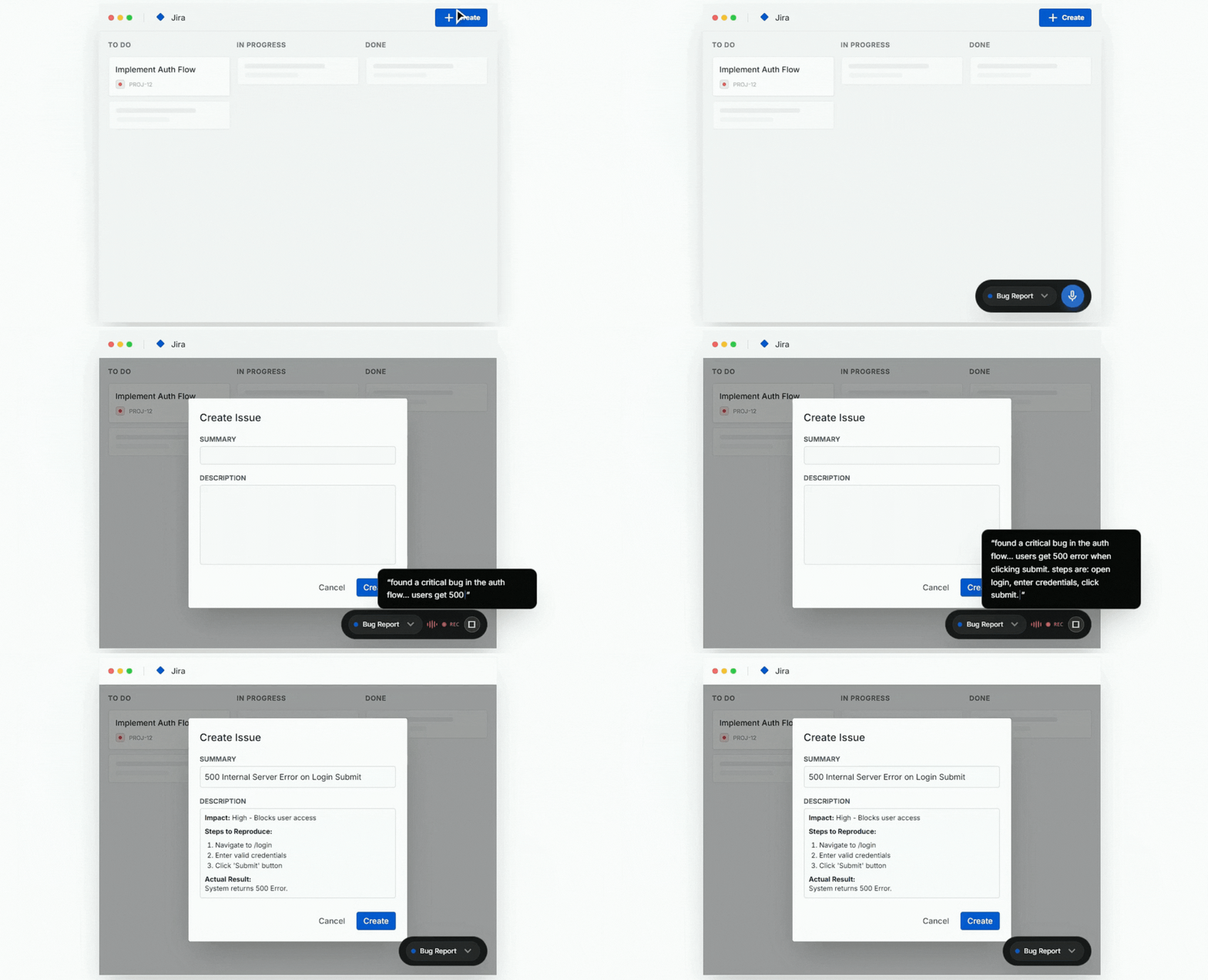
- Jira/Linear tickets (fields and formatting)
- Slack messages (code blocks, links)
The speech to text software should understand these formats.
2. Technical Vocabulary
Developer vocabulary is unique:
- "Kubernetes" not "Cooper Netties"
- "kubectl" not "cube cuttle"
- "GitHub" not "git hub"
- "API" not "A.P.I."
Generic dictation butchers technical terms.
3. Non-Disruptive Workflow
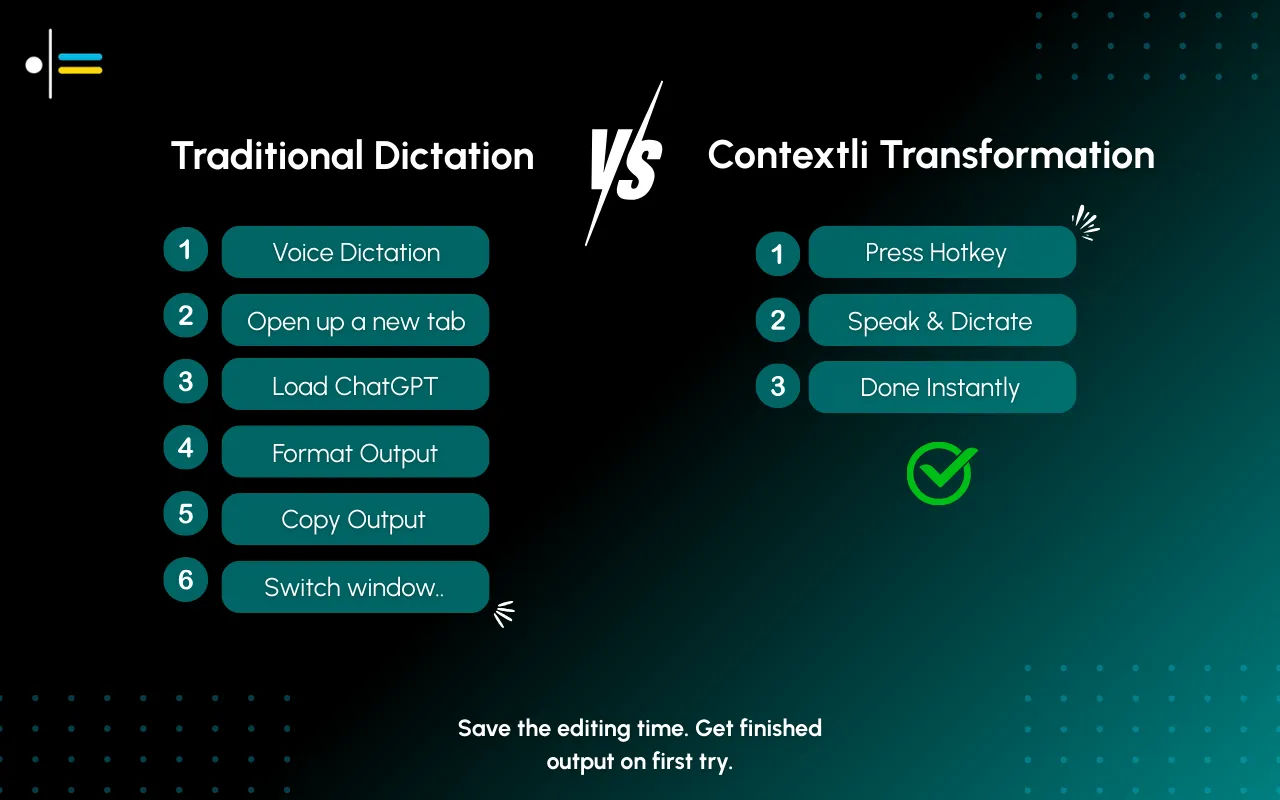
Developers context-switch constantly. A tool that requires:
- Opening a separate app
- Navigating menus
- Copying/pasting output
...breaks flow and isn't worth the friction.
4. Handles Code Adjacent Content
Not dictating code (that's a different problem). But dictating:
- What the code does
- Why you made certain decisions
- How to use something
- What's left to do
How to Choose the Right Dictation Software
Before diving into specific tools, understand what matters for your workflow:
If you primarily write documentation and PR descriptions: Look for format-aware tools with custom output templates. Contextli excels here with its Context system.
If you need accessibility features or have RSI: Prioritize comprehensive voice control. Talon Voice offers full computer control, though it has a steep learning curve.
If you want the simplest setup: Built-in system dictation or Wispr Flow require minimal configuration, though they lack developer-specific features.
If you work in regulated industries: Privacy becomes critical. Local processing options (like Contextli's offline mode) ensure your code discussions never leave your machine.
Consider these questions:
- How much time do you spend on non-code writing daily?
- Do you need cross-platform support (Linux, specifically)?
- Is one-time pricing vs. subscription important to your budget?
- Do you need integration with specific tools (Jira, Linear, Notion)?
#1: Contextli - Best All-Around for Developers
Price: one-time Starter, Pro (most popular) and Pro Plus tiers, see pricing
Platforms: Mac, Windows, Linux
Best for: Documentation, PRs, Slack, email
Why Developers Choose Contextli
Contextli shines for the "writing around code" that eats developer time:
PR Descriptions:
Speak: "added retry logic to the API client, handles rate limiting and network timeouts, includes exponential backoff"
Get:
## Summary
Added retry logic to the API client to handle rate limiting and network timeouts with exponential backoff.

## Changes
- Implemented retry mechanism for transient failures
- Added exponential backoff strategy
- Handles rate limit (429) and timeout errors
Documentation:
Speak: "this function takes a user ID and returns their active subscriptions, throws if user not found"
Get:
## `getActiveSubscriptions(userId: string)`

Returns all active subscriptions for the specified user.

### Parameters
- `userId` (string): The unique identifier for the user

### Returns
Array of active subscription objects

### Throws
- `UserNotFoundError` if the user doesn't exist
Custom Contexts for Developers
Create Contexts for your specific workflows:
- PR Context - Outputs GitHub PR format
- Docs Context - Markdown documentation style
- Slack Context - Casual, includes code block formatting
- Ticket Context - Jira/Linear format with fields
Integration with Developer Tools
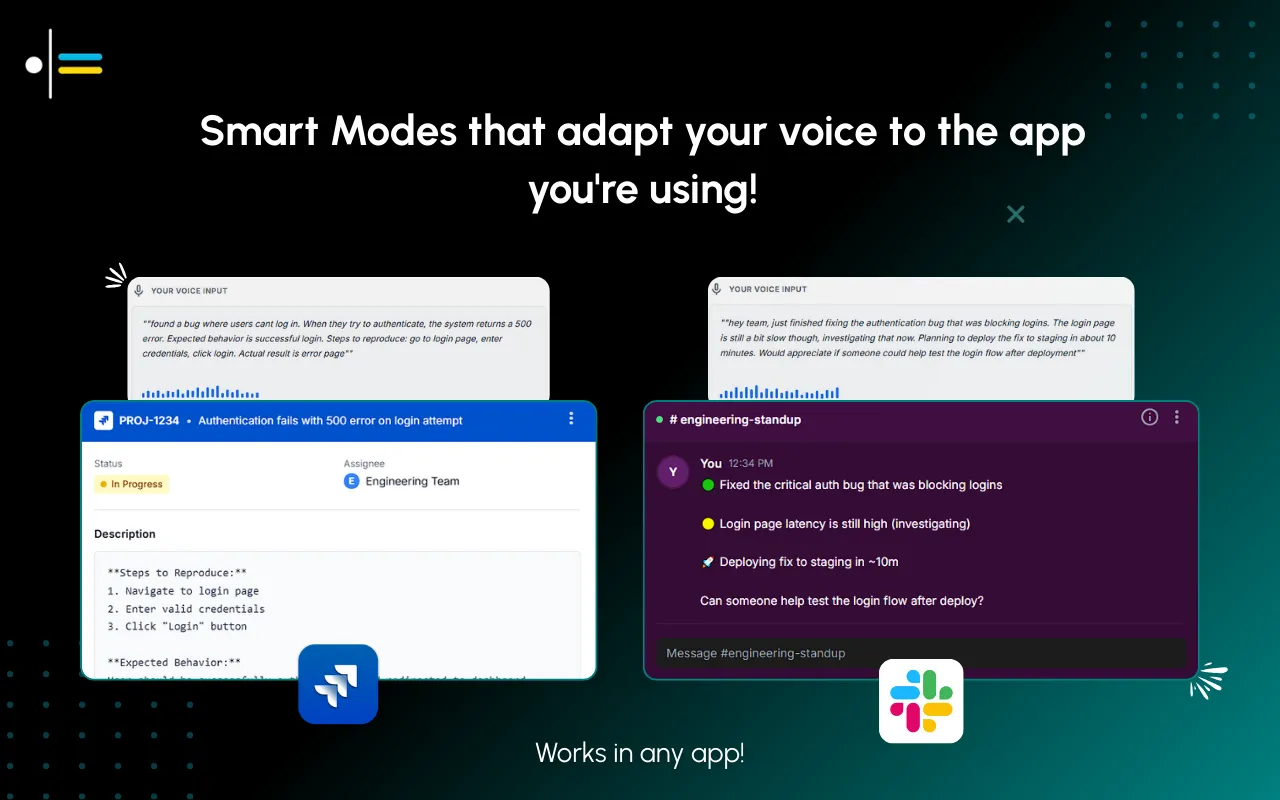
Contextli integrates seamlessly into developer workflows through its universal hotkey system. Unlike browser-based tools, it works across your entire development environment:
- IDEs: VS Code, JetBrains, Vim/Neovim - works in any editor
- Project Management: Jira, Linear, Asana, Notion - voice-to-formatted tickets
- Communication: Slack, Discord, Microsoft Teams - platform-specific formatting
- Documentation: Confluence, Notion, GitBook - Markdown-aware output
- Version Control: GitHub, GitLab, Bitbucket - PR templates and commit messages
The tool doesn't require specific integrations because it operates at the system level, inserting formatted text wherever your cursor is. This means it works with any web app, desktop app, or command-line tool without configuration.
Key Features for Developers
- Hotkey activation - Don't leave your IDE
- Auto-paste - Output appears at cursor
- Technical vocabulary - AI understands dev terms
- Linux support - Unlike most voice tools
- BYOK - Use your own API keys
- Privacy-first - Local processing option available
- Custom output formats - Unlimited Context configurations
Pros for Developers
✅ Format-aware output (Markdown, etc.)
✅ Works on Linux
✅ One-time pricing options
✅ Non-disruptive (hotkey → speak → done)
✅ Custom Contexts for different output types
✅ Strong privacy controls with local mode
Cons
❌ Not for dictating actual code
❌ Requires initial Context setup
#2: GitHub Copilot Chat - Best for In-IDE Docs
Price: $10/mo (Individual) / $19/mo (Business)
Platforms: VS Code, JetBrains, Neovim
Best for: Code-related documentation
Overview
Copilot Chat lives in your IDE and can generate documentation, explain code, and write commit messages based on context.
For Developers
Strengths:
- Understands your codebase
- Generates docs from code
- Explains existing code
- In-IDE (no context switch)
Limitations:
- No voice input
- IDE-only (not for Slack, email)
- Subscription required
- Can't format arbitrary text
Best For
Developers who want AI documentation help directly in their IDE, but don't need voice input.
#3: Wispr Flow - Best for Quick Messages
Price: Free (2K words/wk) / $15/month
Platforms: Mac, Windows, iOS
Best for: Slack messages, quick emails
Overview
Wispr Flow is a general-purpose speech to text app with good accuracy and filler word removal.
For Developers
Strengths:
- Clean transcription
- Cross-platform including mobile
- Works in any app
- Free tier to try
- Mobile apps for on-the-go dictation
Limitations:
- Raw transcription (not format-aware)
- Doesn't understand dev contexts
- No custom formatting Contexts
- Subscription pricing
Best For
Quick Slack messages and emails where formatting doesn't matter much. The mobile app is useful for responding to messages while away from your desk.
#4: Talon Voice - Best for Full Voice Coding
Price: Free (open source)
Platforms: Mac, Windows, Linux
Best for: Accessibility, RSI, voice coding
Overview
Talon is a comprehensive voice control system. It can control your entire computer and even write code by voice.
For Developers
Strengths:
- Full voice coding possible
- Extensive customization
- Complete computer control
- Free and open source
Limitations:
- Steep learning curve
- Requires significant setup
- Not for casual use
- Community-supported
Best For
Developers with RSI or accessibility needs who want to code entirely by voice. Overkill for just dictating docs and messages.
#5: Built-in Dictation - Free Basic Option
Price: Free
Platforms: All
Best for: Rough notes, quick capture
Overview
System dictation (Mac: Fn+Fn, Windows: Win+H) provides basic transcription. On Windows, this comparison of free and paid Windows dictation tools shows where Win+H stops.
For Developers
Strengths:
- Free, pre-installed
- Works anywhere
- No setup
Limitations:
- Mangles technical terms
- No formatting
- All filler words included
- Heavy cleanup required
Best For
Quick notes when nothing else is available. Not for production docs.
Accuracy & Technical Vocabulary
One of the biggest challenges for developers using voice to text software is accuracy with technical terminology. Here's what to expect:
Generic Dictation Tools
Built-in system dictation and general-purpose tools struggle with:
- Framework names (Kubernetes, TensorFlow, PyTorch)
- Command-line tools (kubectl, npm, pip)
- Programming languages (Rust, Elixir, Clojure)
- Technical acronyms (REST, CRUD, JWT)
Expect 60-70% accuracy on technical content, requiring significant editing.
AI-Enhanced Tools
Tools like Contextli and Wispr Flow use AI processing after transcription, which improves technical vocabulary recognition:
- Better context understanding
- Learns from corrections
- Handles technical jargon more naturally
Expect 85-95% accuracy on technical content with minimal editing.
Developer-Specific Tools
Talon Voice allows custom vocabulary addition, so you can teach it project-specific terms, internal tools, and proprietary framework names.
Pro tip: When using any tool, spell out ambiguous terms the first time ("Kubernetes spelled K-U-B-E-R-N-E-T-E-S"), then use them normally. AI tools learn from context.
Privacy & Security for Developer Workflows
Developers often work with proprietary code, internal tools, and sensitive information. Privacy isn't optional.
Cloud Processing Risks
Most voice to text software sends your audio to cloud servers for transcription:
- Your spoken words about internal architecture leave your machine
- API keys, credentials, or sensitive logic could be captured
- Third-party processing means you can't audit what happens to the data
For open-source work or non-sensitive projects, this is fine. For proprietary codebases or regulated industries, it's a problem.
Local Processing Options
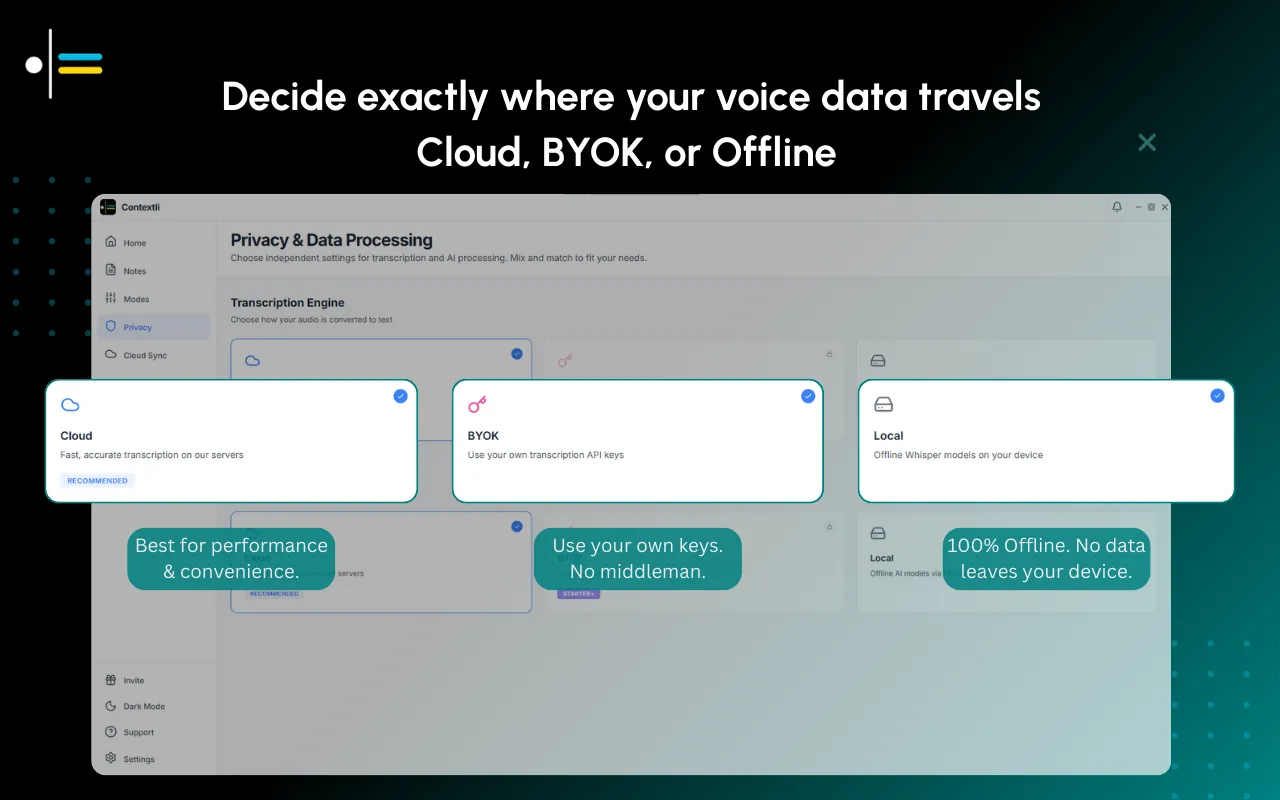
Contextli offers fully local processing:
- Audio transcribed on-device using Whisper
- AI processing runs locally via Ollama
- Zero network calls (verify with Wireshark)
- Compliant with NDAs and security policies
Talon Voice runs entirely locally by default.
Built-in dictation (Mac/Windows) sends audio to Apple/Microsoft servers unless explicitly configured otherwise.
BYOK (Bring Your Own Key)
Contextli also supports BYOK mode:
- Use your own OpenAI, Anthropic, or Deepgram API keys
- Audio flows directly from your device to your provider
- You control data retention policies
- Useful for teams with existing vendor relationships
Recommendation
If you work on proprietary code or under NDA, use local processing or BYOK. Don't trust "encrypted" cloud processing for truly sensitive work.
Developer Use Cases
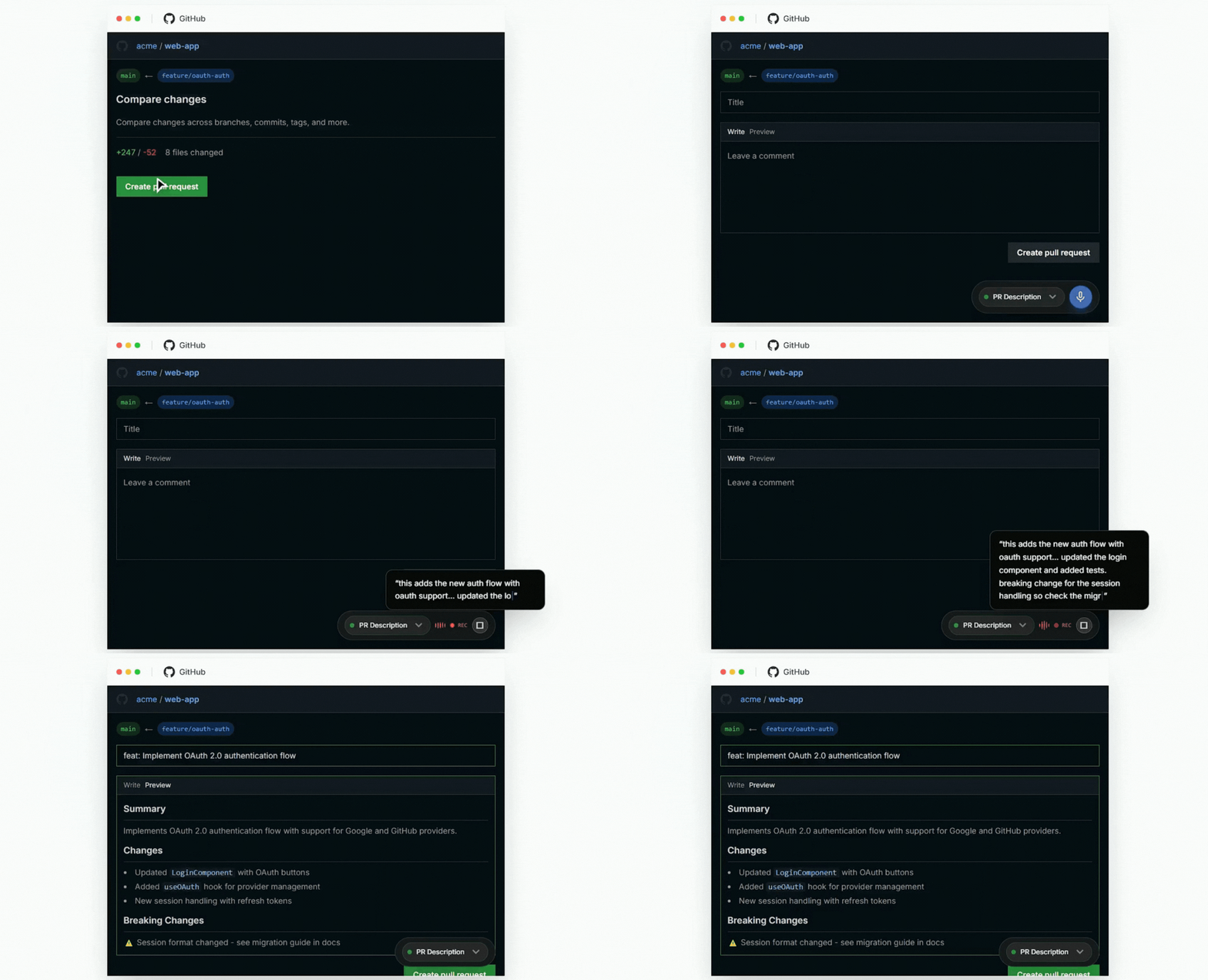
PR Descriptions
The problem: You know what changed and why. Writing it out takes 5-10 minutes.
The solution: Speak it in 30 seconds. Contextli formats as proper PR description.
Example input: "Refactored the auth module to use JWT instead of sessions, added refresh token flow, updated all routes to use new middleware, breaking change for anyone using session auth"
Example output:
## Summary
Refactored authentication from session-based to JWT with refresh token support.

## Changes
- Replaced session-based auth with JWT
- Implemented refresh token flow
- Updated all routes to use new auth middleware

## Breaking Changes
- Session-based authentication is no longer supported
- Clients must implement JWT token handling
Documentation
The problem: Nobody likes writing docs. You'd rather be coding.
The solution: Speak the docs while looking at the code. Get context-aware output.
Slack/Email
The problem: "Quick" messages to stakeholders eat 15-30 minutes daily.
The solution: Speak → formatted message → send. 2 minutes instead of 15.
Commit Messages
The problem: Balancing descriptive with concise.
The solution: Speak what you did. AI formats to conventional commit style.
Feature Comparison
| Feature | Contextli | Copilot Chat | Wispr Flow | Talon | Built-in |
|---|---|---|---|---|---|
| Voice input | ✅ | ❌ | ✅ | ✅ | ✅ |
| Format-aware | ✅ | ✅ | ❌ | ⚠️ | ❌ |
| Technical vocab | ✅ | ✅ | ⚠️ | ✅ | ❌ |
| Works outside IDE | ✅ | ❌ | ✅ | ✅ | ✅ |
| Custom Contexts | ✅ | ❌ | ❌ | ✅ | ❌ |
| Linux | ✅ | ⚠️ | ❌ | ✅ | ⚠️ |
| One-time price | ✅ | ❌ | ❌ | ✅ Free | ✅ Free |
| Low learning curve | ✅ | ✅ | ✅ | ❌ | ✅ |
| Local processing | ✅ | ❌ | ❌ | ✅ | ⚠️ |
| Mobile apps | ❌ | ❌ | ✅ | ❌ | ✅ |
Setting Up Contextli for Dev Workflows
1. Create Dev-Specific Contexts
PR Description Context:
Format as GitHub PR description with Summary, Changes, and any Breaking Changes sections. Use Markdown.
Documentation Context:
Format as technical documentation in Markdown with appropriate headers, parameter descriptions, and examples.
Slack Context:
Format for Slack. Keep casual but clear. Use code blocks for technical terms. Short paragraphs.
2. Assign Hotkeys
Cmd+Shift+P- PR descriptionCmd+Shift+D- DocumentationCmd+Shift+S- Slack message
3. Test with Real Use Cases
Speak a PR description you'd normally write. Compare output to what you'd type.
Adjust Context prompts until output matches your style.
The Developer Time Audit
Estimate your non-code writing time:
| Task | Times/Day | Minutes Each | Daily Total |
|---|---|---|---|
| Slack messages | 20 | 2 | 40 min |
| PR descriptions | 2 | 10 | 20 min |
| Documentation | 1 | 15 | 15 min |
| Emails | 5 | 3 | 15 min |
| Tickets/Issues | 3 | 5 | 15 min |
| Total | 105 min |
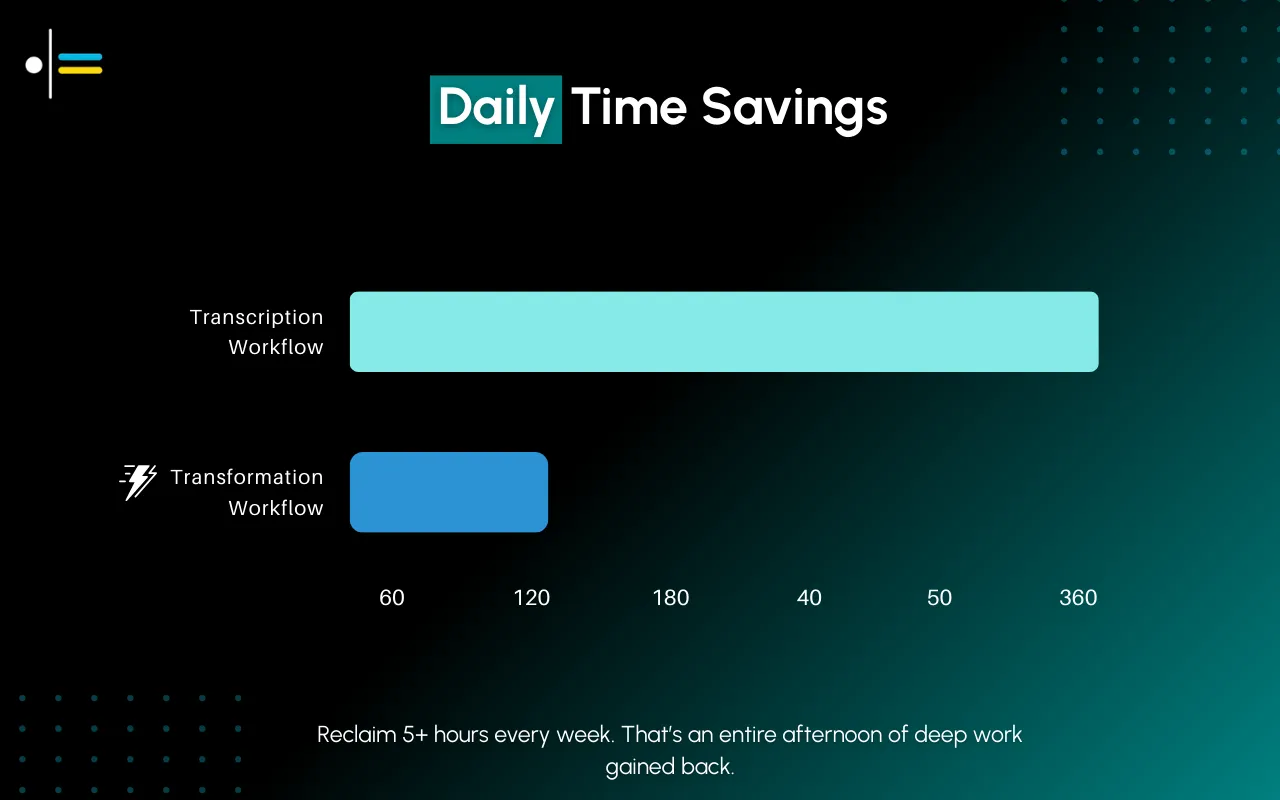
That's nearly 2 hours of typing that isn't coding.
With voice-to-text, cut that to 30-45 minutes.
Reclaimed dev time: 60-75 minutes/day.
Frequently Asked Questions
Can voice dictation actually write code?
Not well. Talon Voice can technically write code via voice, but the learning curve is steep and it's primarily for accessibility needs. For actual coding, your hands and keyboard are still the best interface.
Voice to text software works best for the writing around code: documentation, PR descriptions, messages, tickets, and specs.
Will dictation software understand my accent?
Modern AI-powered tools (Contextli, Wispr Flow) handle most accents well. They improve over time as they process more of your speech. Built-in system dictation varies - Apple's is generally better with accents than Windows.
If accuracy is a concern, try tools with free tiers first (Wispr Flow, built-in dictation) before committing to paid options.
Do I need an internet connection?
It depends on the tool:
- Contextli: Offers local mode that works completely offline
- Wispr Flow: Requires internet (cloud processing)
- Talon Voice: Works offline
- Built-in dictation: Mac and Windows send to cloud by default, but can be configured for on-device processing
- Copilot Chat: Requires internet
If you work in secure environments or with sensitive code, choose tools with local processing.
How long does it take to learn?
- Basic dictation: 5-10 minutes. Speak, get text, done.
- Format-aware tools (Contextli): 30 minutes to set up Contexts, then immediate productivity gains
- Talon Voice: Weeks to months to become proficient
Most developers see productivity gains within the first day of using format-aware tools.
Can I use this for code reviews?
Yes, especially for writing review comments. Tools like Contextli can format constructive code review feedback. Speak your thoughts, get a well-structured comment.
Not useful for reading code aloud (you still need to read it visually), but great for documenting what you found.
What about technical terms my company invented?
AI-powered tools learn from context. The first time you use an internal term, spell it out ("our framework Nebula, spelled N-E-B-U-L-A"). After that, the tool will usually recognize it.
For frequently used proprietary terms, create a custom Context that includes examples of those terms in the system prompt.
Recommendation
Best all-around for developers: Contextli
- Format-aware output for PR descriptions, docs, Slack
- Works on Linux (rare for voice tools)
- Non-disruptive workflow (hotkey activation)
- One-time pricing options (Starter, Pro, Pro Plus)
- Local processing for sensitive work
- Strong integration support across dev tools
For in-IDE documentation: GitHub Copilot Chat ($10-19/mo)
- Already in your workflow
- Understands your code context
- No voice input though
For accessibility/RSI: Talon (Free)
- Comprehensive voice control
- Can actually write code by voice
- Significant learning investment
How much time do you spend on non-code writing? Share in the comments.
Next Resources
More guides to level up your developer productivity:
- 7 Ways to Write Faster Without Typing (I Use #3 Daily) - Practical methods ranked by real time savings, from built-in dictation to AI-powered transformation
- Voice to Text Software: 5 Best Superwhisper Alternatives - Cross-platform alternatives compared with pricing, features, and accuracy
- Voice Recognition Software Compared: 4 Wispr Flow Alternatives - Side-by-side comparison of the top voice recognition tools available today
- MacWhisper Alternatives: 4 Voice Tools for Mac Users - Best options for Mac users looking beyond MacWhisper

About the Author
Founder writing emails, Slack messages, support tickets, LinkedIn posts, and team documentation daily.
Read Next
OpenAI Dots vs Grok Bot: Which Always-On AI Agent Should You Use? (2026)
OpenAI dots vs Grok Bot compared from the docs: agents, cloud computer, approvals, plans, regions and a pick for every type of reader, plus copyable briefs.

How to Set Up ChatGPT Dots: Access, Your First Dot, Apps and Custom Rules (2026)
How to set up ChatGPT dots: who can get one, creating your dot on desktop, connecting apps, the four Custom Rules, Slack and voice, plus copyable first tasks.

Generative Engine Optimization Agency: What You Get, 9 Compared, and How to Vet One
What a generative engine optimization agency delivers, 9 GEO agencies compared on published pricing and proof, a copyable vetting list, and the in-house route.