

Best Speech to Text Mac Software: 7 Tools Compared (2026)
Mac has the best voice input options. Here's how to choose.
Mac users have more quality speech to text mac options than any other platform. From Apple's built-in dictation to specialized tools like Superwhisper and MacWhisper, the ecosystem is rich with voice to text software designed specifically for macOS.
But which one is right for you?
This guide compares 8 dictation tools available for Mac, from free to premium, transcription to transformation. Whether you're looking for basic mac voice to text capabilities or advanced productivity features, you'll find the right match here.
Quick Answer: Best Mac Dictation Software
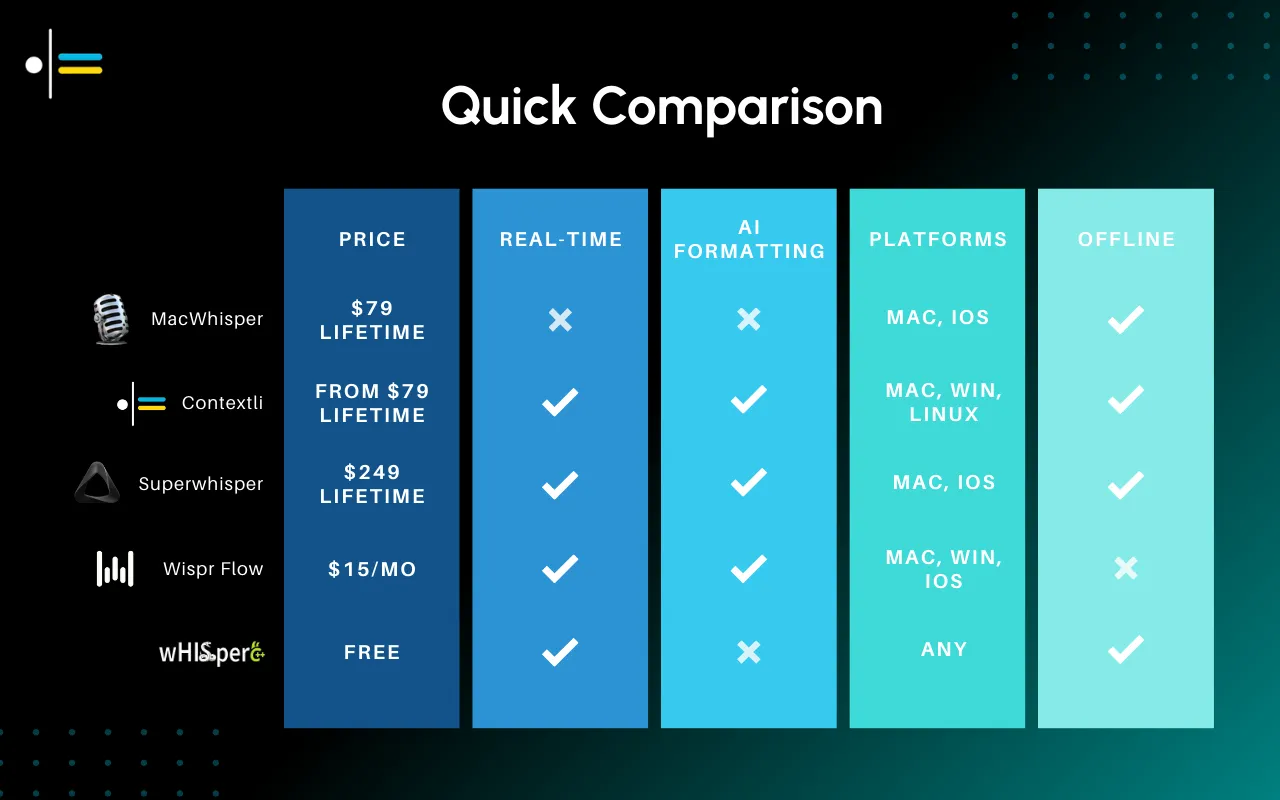
| Tool | Price | Type | Best For |
|---|---|---|---|
| Contextli ⭐ | One-time, lifetime (pricing) | Transformation | Productivity, context-aware output |
| Superwhisper | $249 lifetime | Both | Power users |
| MacWhisper | $69 lifetime | Transcription | Budget privacy |
| Wispr Flow | $15/mo | Clean transcription | General dictation |
| Built-in Dictation | Free | Basic transcription | Casual use |
| Whisper Transcription | $4.99 | File transcription | Audio files |
| Dragon for Mac | Discontinued | - | Legacy users only |
#1: Contextli - Best for Productivity
Price: one-time, lifetime (see pricing)
Type: Transformation (AI-context-aware output)
Platforms: Mac, Windows, Linux
Overview
Contextli transforms natural speech into formatted, professional text. Unlike transcription tools, you don't need to edit the output-it's ready to use. This makes it the most productive speech to text mac solution available today.
Key Features
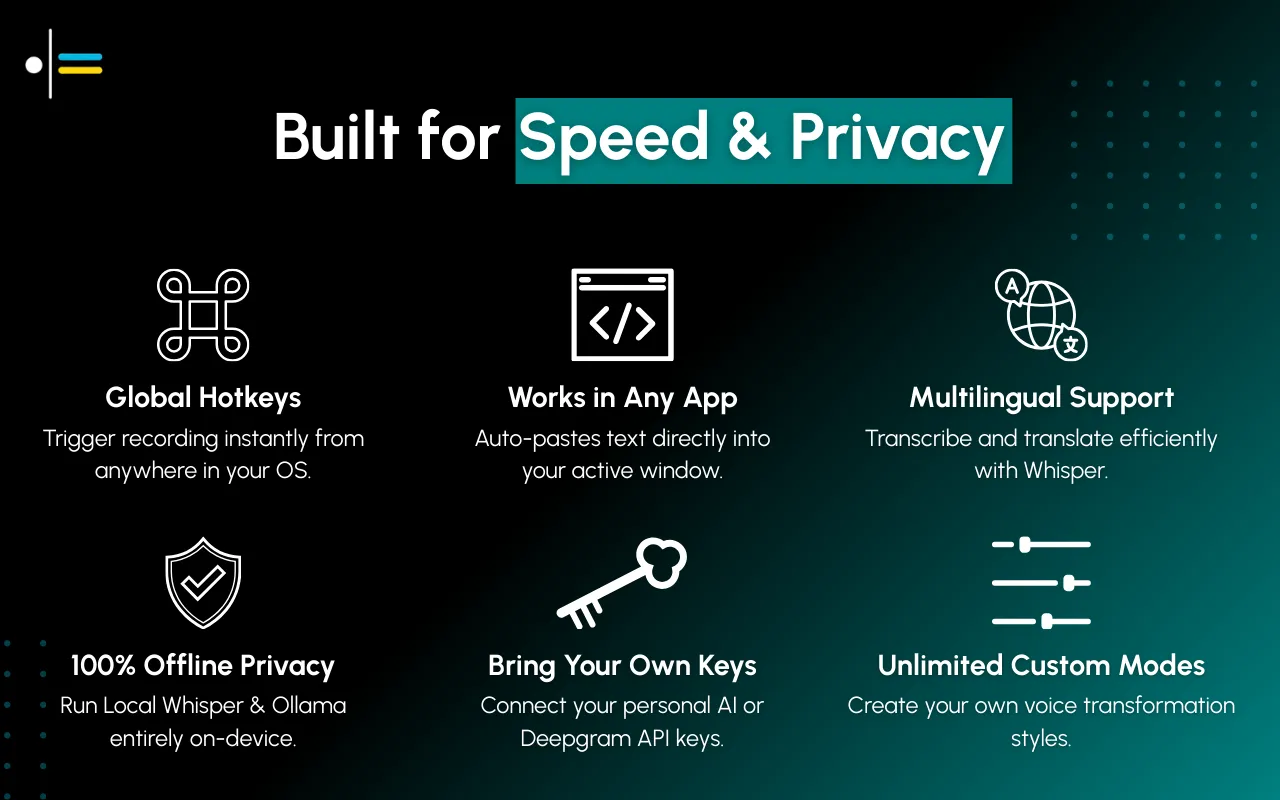
- Custom Contexts - Define output formats (Email, Slack, Document)
- Global Hotkeys - Activate from any app
- Auto-Paste - Output appears at cursor
- Privacy Options - Local Whisper or BYOK
- Cross-Platform - Also works on Windows/Linux
Mac-Specific Notes
- Native macOS app
- Menu bar access
- Integrates with system permissions smoothly
- Works in all Mac apps
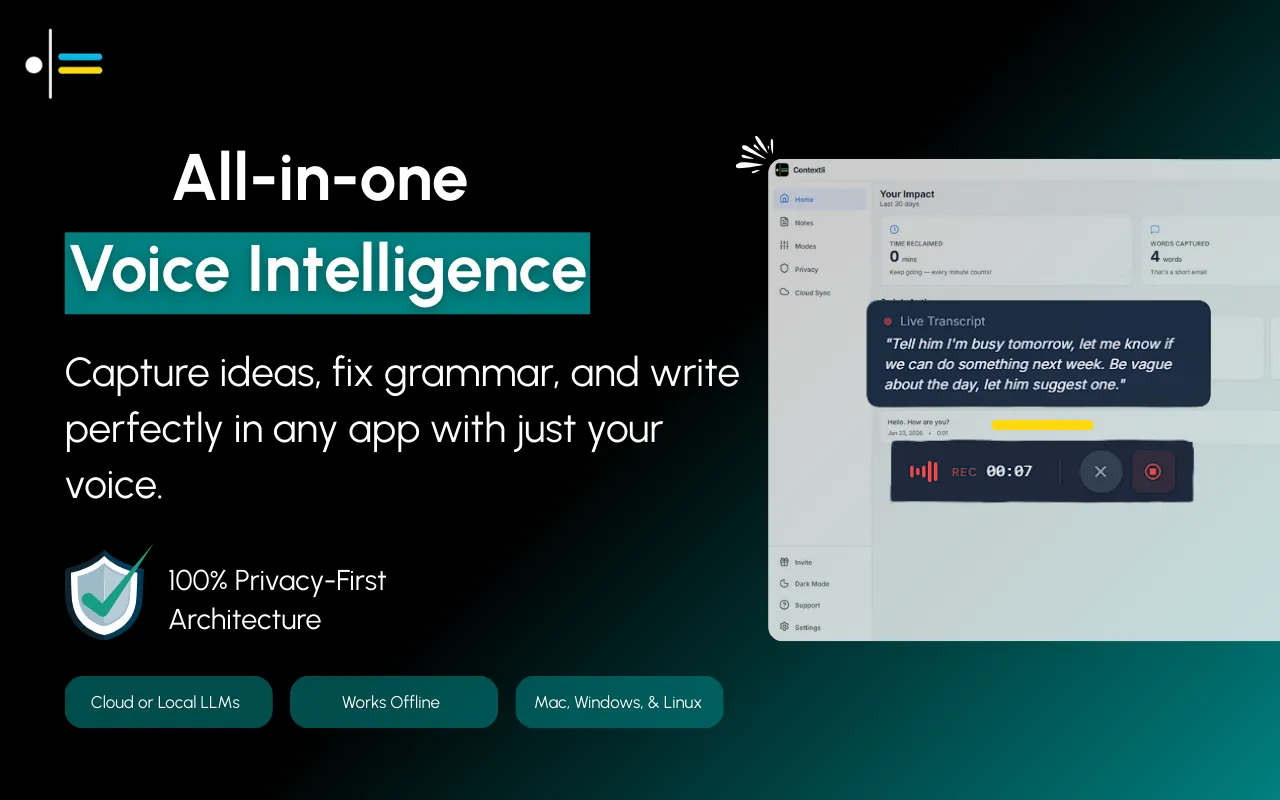
How Contextli's Context Mode Works
This is where Contextli separates itself from basic mac dictation software. Instead of just transcribing your words, it transforms your intent into polished output.
Example: Email Context
You speak (15 seconds): "Tell Michael I can't make tomorrow's meeting, something came up. Ask if we can reschedule for next week but don't commit to a specific day, let him suggest."
Contextli outputs:
Hi Michael,
Thanks for setting up tomorrow's meeting. Unfortunately, something's come up on my end and I won't be able to make it.
Would next week work instead? I'm fairly flexible - let me know what works best for your schedule and I'll make it happen.
Appreciate your understanding.
Best,
Alex.
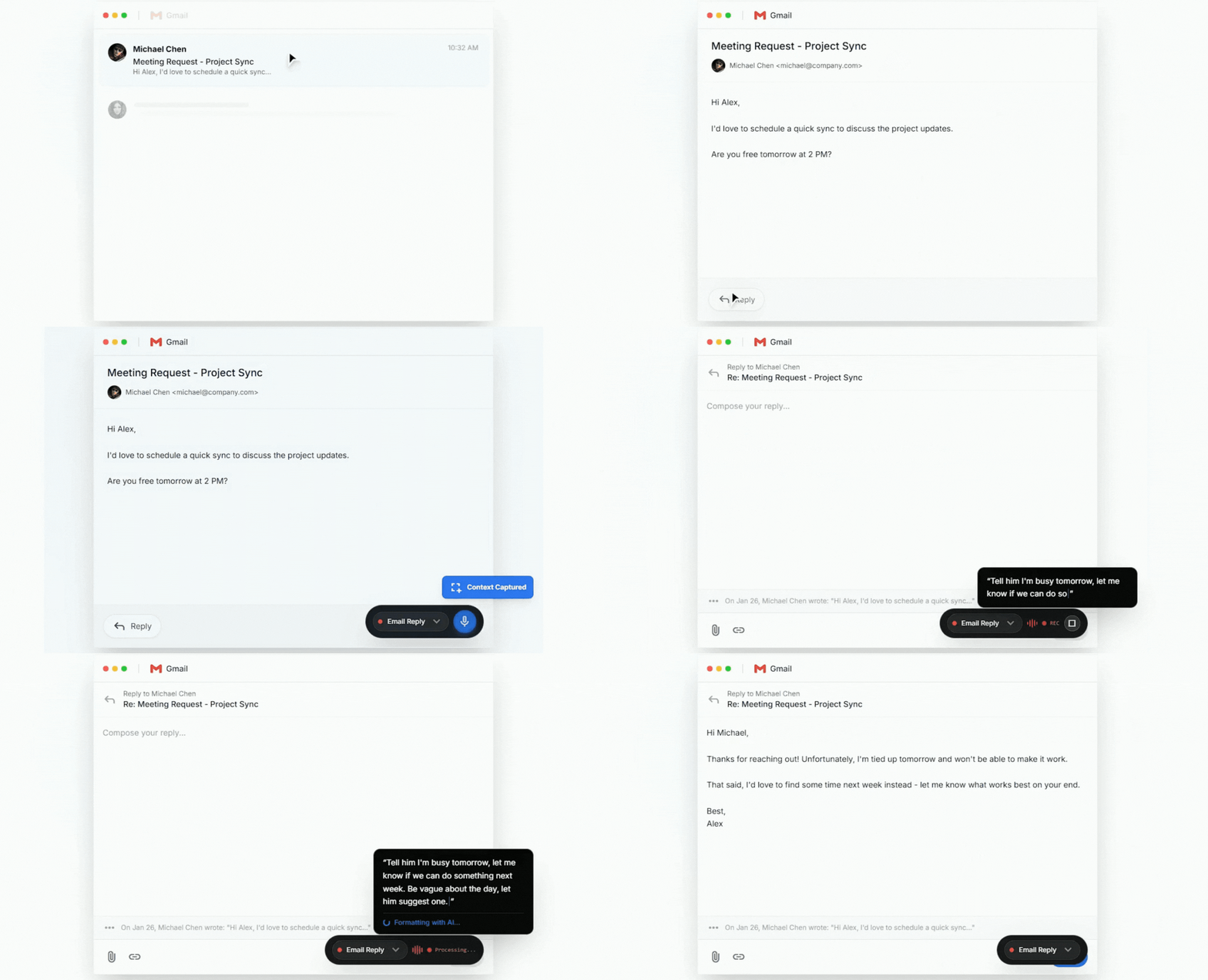
That's not transcription. That's your rough thought transformed into a professional email ready to send. Same input, different Context = different formatted output for Slack, LinkedIn, Jira, or any use case you define.
Pros
✅ Context-aware output ready to send
✅ One-time pricing, no subscription
✅ Custom Contexts for different use cases
✅ Privacy options (local processing)
✅ Works across platforms
Cons
❌ Requires Context setup initially
❌ Not for long-form transcription
Best For
Mac users who want voice input for daily productivity-emails, messages, documentation-without editing overhead. If you're looking for dictation for mac that actually saves time rather than just transcribing, this is it.
#2: Superwhisper - Best for Mac Power Users
Price: $8.49/mo or $249 lifetime
Type: Both (transcription and transformation)
Platforms: Mac, iOS only
Overview
Superwhisper is the most full-featured Mac-native voice tool. It offers extensive customization, multiple modes, and both transcription and AI-context-aware output.
Key Features
- Multiple Modes - Transcription, formatting, custom (Superwhisper terminology)
- Offline Capable - Local Whisper processing
- Extensive Settings - Deep customization
- iOS Companion - Works on iPhone/iPad too
Mac-Specific Notes
- Built specifically for Mac
- Deep macOS integration
- Menu bar app
- Keyboard Maestro compatible
Pros
✅ Most customizable Mac option
✅ Both transcription and transformation
✅ Fully offline capable
✅ Lifetime license available
Cons
❌ Mac only (no Windows/Linux)
❌ Expensive ($249)
❌ Steeper learning curve
❌ No cross-platform sync
Best For
Mac power users who want maximum customization and don't need cross-platform support. This is premium mac speech to text software for users who want to tweak every setting.
#3: MacWhisper - Best Budget Mac Option
Price: Free / $29 (Pro) / $69 (Pro+)
Type: Transcription
Platforms: Mac only
Overview
MacWhisper is a straightforward Whisper-based transcription tool. It's affordable, fully local, and focused on one thing: converting speech to text.
Key Features
- Local Processing - All on-device, private
- File Transcription - Drag and drop audio files
- Multiple Languages - Whisper's language support
- Simple Interface - No complexity
Mac-Specific Notes
- Native Mac app
- Apple Silicon optimized
- Uses local Whisper models
- No account required
Pros
✅ Affordable ($69 lifetime)
✅ Fully private (local only)
✅ Simple, focused
✅ Good for file transcription
Cons
❌ Raw transcription only (needs editing)
❌ Limited real-time dictation
❌ No AI formatting
❌ Mac only
Best For
Mac users who want basic, private transcription at a low price point. Good entry-level dictation for mac users.
#4: Wispr Flow - Best Subscription Option
Price: Free (2K words/wk) / $15/mo
Type: Clean transcription
Platforms: Mac, Windows, iOS
Overview
Wispr Flow automatically removes filler words and handles self-corrections. It's cleaner than raw transcription but doesn't fully format output.
Key Features
- Filler Word Removal - "um," "uh," etc. removed
- Self-Correction - "Tuesday... actually Wednesday" → "Wednesday"
- Cross-App - Works everywhere
- Free Tier - 2,000 words/week free
Mac-Specific Notes
- Native Mac app
- Menu bar access
- Works with all Mac apps
- Also has iOS app
Pros
✅ Free tier to try
✅ Cleaner than raw transcription
✅ Cross-platform
✅ Good accuracy
Cons
❌ Subscription only
❌ Cloud-dependent
❌ Still needs some editing
❌ No custom formatting
Best For
Users who want cleaner transcription than built-in and are okay with subscriptions. A middle ground between basic mac voice to text and full transformation tools.
#5: Built-in Mac Dictation - Best Free Option
Price: Free
Type: Basic transcription
Platforms: Mac (built-in)
Overview
macOS includes dictation. Press Fn twice (or your configured shortcut) and speak. It's basic but free and always available.
Key Features
- Pre-installed - No setup required
- System-Wide - Works in all text fields
- Offline Option - Enhanced Dictation (download required)
- Multiple Languages - Many supported
How to Enable
System Settings → Keyboard → Dictation → On
Pros
✅ Free
✅ Already installed
✅ Works everywhere
✅ No account needed
Cons
❌ Raw transcription
❌ Heavy editing needed
❌ Limited accuracy
❌ No AI enhancement
Best For
Occasional use, rough drafts, or users who don't want to install anything. This is the most basic speech to text mac option-it works, but don't expect polish.
#6: Whisper Transcription - Best for Audio Files
Price: $4.99 (one-time)
Type: File transcription
Platforms: Mac only
Overview
Whisper Transcription is a simple app for transcribing audio and video files. It's not for live dictation-it's for processing recordings.
Key Features
- File-Based - Drag and drop audio/video
- Batch Processing - Multiple files at once
- Export Options - Various formats
- Affordable - $4.99 one-time
Pros
✅ Very affordable
✅ Good for file transcription
✅ Simple interface
✅ One-time purchase
Cons
❌ Not for live dictation
❌ Raw transcription only
❌ Limited features
Best For
Users who need to transcribe existing audio files, not live dictation.
#7: Dragon for Mac - Legacy Only
Price: Discontinued
Type: Professional transcription
Platforms: Mac (older versions only)
Overview
Nuance discontinued Dragon for Mac in 2018. It's no longer sold or updated. Some users still run old versions, but it's not recommended for new users.
Current Status
- No longer available for purchase
- No updates or support
- Compatibility issues with newer macOS
- Not recommended
Alternative
For professional dictation on Mac, consider Superwhisper ($249) or Contextli as modern replacements.
Understanding the Two Types of Mac Voice Software
Before choosing, understand the fundamental difference:
Transcription Tools
These convert your speech into text word-for-word. What you say is what you get, including filler words, incomplete sentences, and grammatical errors. You'll spend time editing.
Examples: MacWhisper, Built-in Dictation, Whisper Transcription
Transformation Tools
These convert your intent into formatted output. You speak naturally, and AI restructures your words into polished, ready-to-use content based on the context you're working in.
Examples: Contextli, Superwhisper (in certain modes)
Which do you need? If you're writing rough drafts or taking notes, transcription is fine. If you're writing emails, messages, or documentation you need to send immediately, transformation saves dramatically more time.
Feature Comparison Matrix
| Feature | Contextli | Superwhisper | MacWhisper | Wispr | Built-in |
|---|---|---|---|---|---|
| Context-aware output | ✅ | ✅ | ❌ | ⚠️ | ❌ |
| Custom Contexts/modes | ✅ | ✅ | ❌ | ❌ | ❌ |
| Offline option | ✅ | ✅ | ✅ | ❌ | ✅ |
| Auto-paste | ✅ | ✅ | ❌ | ✅ | ✅ |
| Hotkey activation | ✅ | ✅ | ⚠️ | ✅ | ✅ |
| File transcription | ⚠️ | ✅ | ✅ | ❌ | ❌ |
| Cross-platform | ✅ | ❌ | ❌ | ✅ | ❌ |
| Free tier | ❌ | ❌ | ✅ | ✅ | ✅ |
| One-time price | ✅ | ✅ $249 | ✅ $69 | ❌ | ✅ |
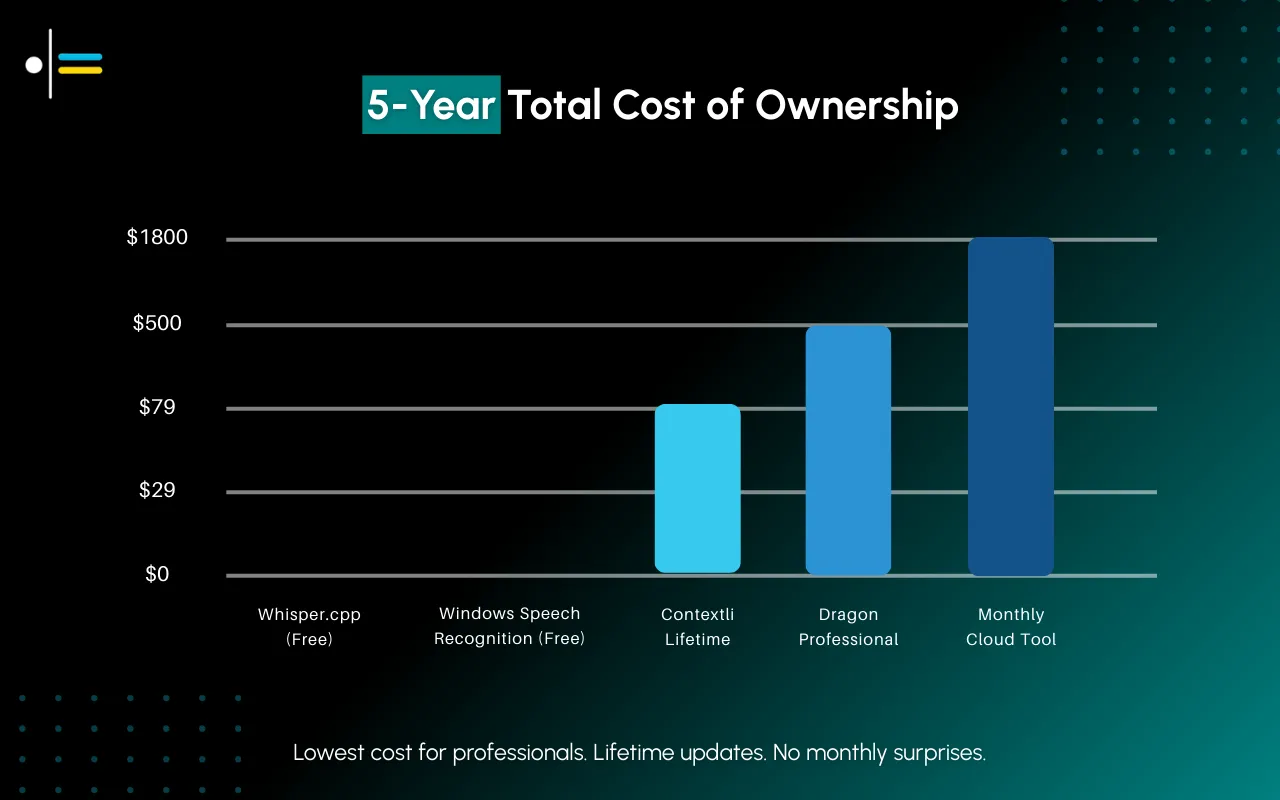
Price Comparison (2 Years)
| Tool | Monthly | Year 1 | Year 2 Total |
|---|---|---|---|
| Contextli | - | One-time, see pricing | Same one-time price |
| Superwhisper | $8.49 | $102 / $249 | $249 |
| MacWhisper | - | $69 | $69 |
| Wispr Flow | $15 | $180 | $360 |
| Built-in | - | Free | Free |
Price Comparison (5 Years)
How to Choose the Right Mac Dictation Software
Consider Your Primary Use Case
Daily professional communication (email, Slack, messages):
→ Contextli or Superwhisper
These transform your speech into formatted output ready to send.
Long-form content creation (articles, reports, documentation):
→ Wispr Flow or MacWhisper
Cleaner transcription that you'll edit into shape.
File transcription (interviews, meetings, podcasts):
→ MacWhisper or Whisper Transcription
Designed for processing recorded audio.
Casual occasional use:
→ Built-in Mac Dictation
Free and already there.
Consider Your Privacy Requirements
Maximum privacy (regulated industries, sensitive data):
→ Contextli (local mode), MacWhisper, or Superwhisper (offline)
All processing stays on your device.
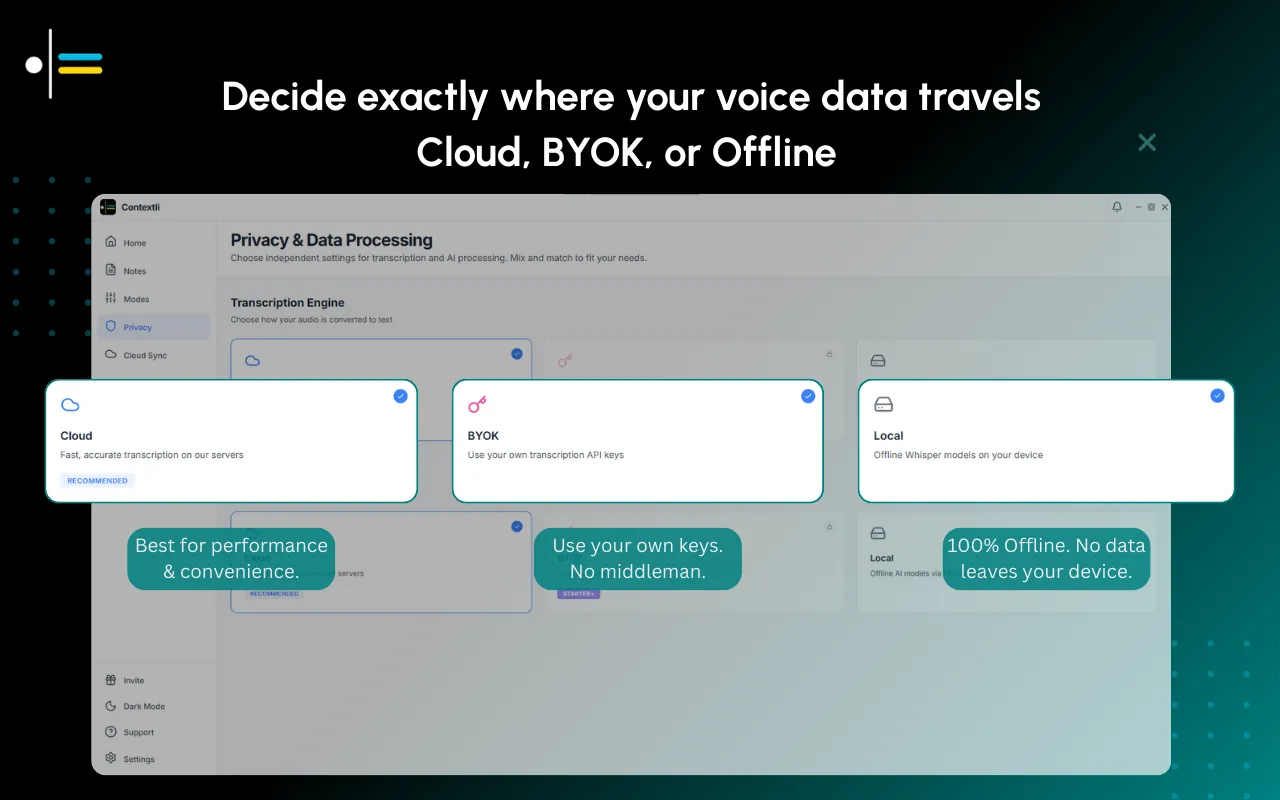
Standard privacy (general business use):
→ Any cloud-based option works
Most services are encrypted and delete data after processing.
Consider Your Budget
Under $100:
→ MacWhisper ($69)
$100-$250:
→ Superwhisper ($249)
Buy once instead of subscribing:
→ Contextli is a one-time purchase rather than a subscription, see pricing
Subscription comfortable:
→ Wispr Flow ($15/mo) or Superwhisper ($8.49/mo)
Free trial first:
→ Built-in Dictation or Wispr Flow (2K words/week free)
Consider Platform Flexibility
Mac only, staying Mac:
→ Any option works
Might switch platforms or use Windows/Linux:
→ Contextli or Wispr Flow
Both are cross-platform. If a Windows PC is in the mix, the Windows dictation software comparison covers the free built-in tools and which apps support ARM laptops.
Recommendations by Use Case
For Daily Email/Message Productivity
- Context-aware output ready to send
- Custom Contexts for different use cases
- Best value for productivity focus
- One-time pricing
For Mac Power Users
Superwhisper ($249)
- Maximum customization
- Both transcription and transformation
- Deep macOS integration
- Lifetime license
For Budget-Conscious Privacy
MacWhisper ($69)
- Fully local processing
- Simple and affordable
- Good for basic transcription
- One-time purchase
For Trying Voice Input
Built-in Dictation (Free) or Wispr Flow (Free tier)
- No cost to experiment
- See if voice input works for you
- Upgrade later if needed
For File Transcription
MacWhisper ($69) or Whisper Transcription ($4.99)
- Drag and drop audio files
- Batch processing
- Simple workflow
Common Questions About Mac Dictation Software
Does Mac have built-in speech to text?
Yes. Mac includes basic dictation (press Fn twice) that works in any text field. It's free and pre-installed, but output is raw transcription requiring editing. For better accuracy and formatting, third-party tools like Contextli offer superior results.
What's the difference between dictation and speech recognition on Mac?
These terms are often used interchangeably, but technically:
- Speech recognition = the technology that understands spoken words
- Dictation = the application of that technology to produce written text
All the tools in this guide use speech recognition to enable dictation.
Can I use dictation software offline on Mac?
Yes. Several options work fully offline:
- Contextli (local mode with Whisper)
- MacWhisper (fully local by default)
- Superwhisper (offline mode available)
- Built-in Mac Dictation (enhanced offline mode downloadable)
Offline processing ensures your speech never leaves your device-critical for privacy-sensitive work.
Is paid dictation software worth it over free options?
Depends on your usage:
Stick with free if: You dictate occasionally, are comfortable editing raw transcripts, and don't need formatting.
Upgrade to paid if: You dictate daily, editing transcripts wastes significant time, you need context-aware formatting, or you require better accuracy.
Most professionals who dictate regularly save hours per week with paid tools. At an hourly rate of $50, saving 2 hours/week means paid dictation for mac software pays for itself in a month.
What's the most accurate speech to text mac software?
Accuracy depends on the underlying model:
Cloud-based (best accuracy): Contextli (cloud mode), Wispr Flow, Superwhisper (online mode)
These use the latest server-side models with more processing power.
Local (good accuracy): Contextli (local mode), MacWhisper, Superwhisper (offline)
These use Whisper models locally-slightly less accurate but still excellent and private.
Built-in (acceptable accuracy): Mac's native dictation
Works for casual use but expect more errors.
In practice, all modern options based on Whisper (most tools listed here) offer comparable accuracy. The bigger difference is in formatting and output quality.
Final Recommendation
Best overall for Mac: Contextli
For most Mac users who want voice input to improve productivity-writing emails, messages, and documents faster-Contextli offers the best combination of features, pricing, and output quality.
Unlike transcription tools, Contextli produces formatted, professional output without editing. Unlike Superwhisper, it's available on other platforms too (if you ever need it) at a lower price. And unlike subscription services, you pay once and own it.
The context-aware transformation is what makes it worth it. You're not just getting your words transcribed-you're getting your intent transformed into the right format for whatever you're working on.
Next Steps
-
Try the free option first: Enable Built-in Mac Dictation or sign up for Wispr Flow's free tier to see if voice input fits your workflow.
-
Identify your primary use case: Are you transcribing files, writing messages, or creating long-form content? This determines which tool type you need.
-
Test a paid option: If voice input works for you, invest in a tool designed for your use case. The time savings compound quickly.
-
Set up contexts/modes: Whichever tool you choose, spend 15 minutes setting up custom contexts for your most common writing tasks. This is where productivity gains really happen.
What Mac dictation software do you use? Share your experience in the comments.
Next Resources
More guides to improve your voice-to-text workflow:
- MacWhisper Alternatives: 4 Voice Tools for Mac Users (2026) - Compare Mac-specific voice tools including Contextli, Superwhisper, and Wispr Flow for real-time dictation
- Voice Recognition Software Compared: 4 Wispr Flow Alternatives (2026) - Find the best voice recognition software beyond Wispr Flow with feature and pricing comparisons
- Voice to Text Software: 5 Best Superwhisper Alternatives 2026 - Cross-platform voice to text options with one-time, lifetime pricing
- 7 Ways to Write Faster Without Typing (I Use #3 Daily) - Practical methods to speed up writing 3x, including voice transformation techniques

About the Author
Founder writing emails, Slack messages, support tickets, LinkedIn posts, and team documentation daily.
Read Next
OpenAI Dots vs Grok Bot: Which Always-On AI Agent Should You Use? (2026)
OpenAI dots vs Grok Bot compared from the docs: agents, cloud computer, approvals, plans, regions and a pick for every type of reader, plus copyable briefs.
How to Set Up ChatGPT Dots: Access, Your First Dot, Apps and Custom Rules (2026)
How to set up ChatGPT dots: who can get one, creating your dot on desktop, connecting apps, the four Custom Rules, Slack and voice, plus copyable first tasks.

Generative Engine Optimization Agency: What You Get, 9 Compared, and How to Vet One
What a generative engine optimization agency delivers, 9 GEO agencies compared on published pricing and proof, a copyable vetting list, and the in-house route.