
What we did, and how you get there faster
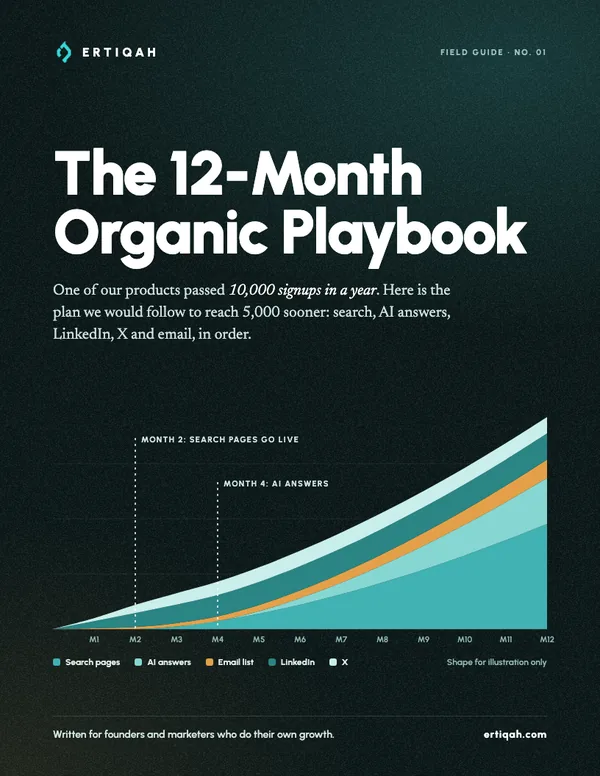
Between one November and the next, LiGoSocial passed about 10,000 signups, and our audio AI app added another 3,000 to 4,000. Two newer products then reached 1,000 signups in about two months and passed 2,000 even faster. Below is what we focused on, in the order we would do it again, so you reach your first 5,000 users sooner than we did.
~10,000
signups in a year on LiGoSocial
3,000 to 4,000
on our audio AI app
1,000
signups in about two months, twice
15+
sites running one search loop
Five thousand users is 14 signups a day
Five thousand in a year is about 420 signups a month. How many visits that takes depends on your signup rate, so find yours first: in GA4, divide signups by sessions for the last 30 days.
Going from 2% to 3% cuts the traffic you need by a third, and it takes weeks. Doubling traffic takes months. That is why month one is about the offer page and your profile.
Which channel to start in which month
LinkedIn and X can bring signups within weeks. Search takes months. Your newsletter holds on to the people both of them send you.
- FoundationMonths 1 to 2
One clear offer page. Search Console, Bing Webmaster Tools and GA4 connected. A lead magnet with an email form. Your LinkedIn profile rewritten as a landing page. Then a test: can you draw 1,000 organic visitors in the two weeks after launch? If not, the problem is usually positioning, and more content will not fix it.
- Search loop onMonths 2 to 4
Write the context document and connect your search data. Long-tail pages first, medium keywords from week three, the quick-win loop from month three.
- Social loopsMonths 3 to 6
A daily comment block on LinkedIn, a reply routine on X, and same-morning cross-posts to Medium and Reddit.
- AI answersMonths 4 to 9
GEO fixes, comparison and “best X” pages, and a monthly prompt test.
- CompoundMonths 6 to 12
Refresh the pages sitting on page two. Add keyword-grid pages only if they pass the quality gate. Keep the newsletter weekly, and move most of your hours to your two best channels.
Search runs on loops
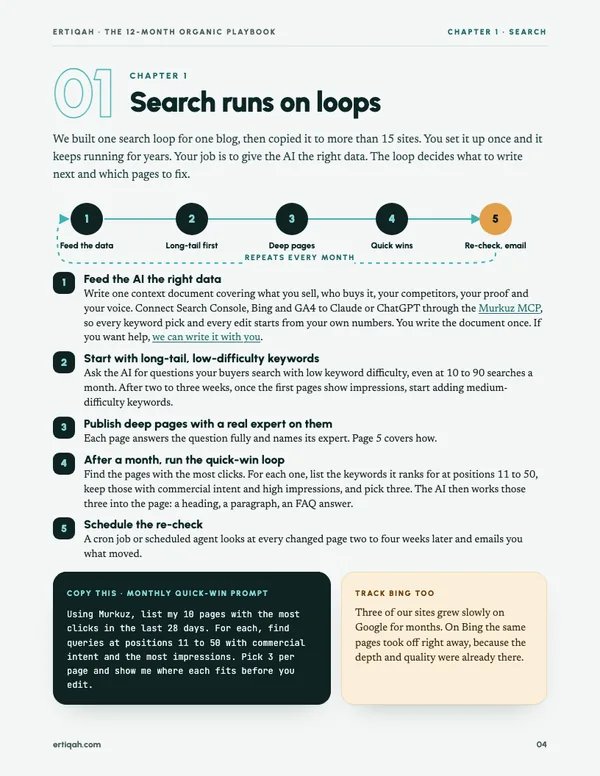
We built one search loop for one blog, then copied it to more than 15 sites. You set it up once and it keeps running for years. Your job is to give the AI the right data. The loop decides what to write next and which pages to fix.
- 1
Feed the AI the right data
Write one context document covering what you sell, who buys it, your competitors, your proof and your voice. Then connect Search Console, Bing and GA4 to Claude or ChatGPT through the Murkuz MCP, so every keyword pick and every edit starts from your own numbers. You write the document once. If you want help, we can write it with you.
- 2
Start with long-tail, low-difficulty keywords
Ask the AI for questions your buyers search that have low keyword difficulty, even at 10 to 90 searches a month. After two to three weeks, once the first pages show impressions, start adding medium-difficulty keywords.
- 3
Publish deep pages with a real expert on them
Each page answers the question fully and names the person who knows the topic best. The next section covers how.
- 4
After a month, run the quick-win loop
Find the pages with the most clicks. For each one, list the keywords it ranks for at positions 11 to 50, keep those with commercial intent and high impressions, and pick three. The AI works those three into the page: a heading, a paragraph, an FAQ answer.
- 5
Schedule the re-check
A cron job or scheduled agent looks at every changed page two to four weeks later and emails you what moved. Then the loop starts again.
Using Murkuz, list my 10 pages with the most clicks in the last 28 days.
For each page, find the queries ranking at positions 11 to 50 with commercial intent and the most impressions.
Pick the 3 best per page and show me where each one fits (a heading, a paragraph or an FAQ answer) before you edit anything.
Track Bing too
Three of our sites grew slowly on Google for months. On Bing the same pages took off right away, because the depth and quality were already there.
Search is slow at first
Across 633 new articles on 9 of our sites, the median article got its first Google impression after 10 days and its first week on page one after 154 days.
Write pages worth ranking
Step 3 of the loop is where most sites cut corners. A page has to be the most useful answer on the results page, and it has to show who stands behind it.
Pick keywords you can win
A new site will not rank for a term with 5,000 monthly searches this year. Pick long-tail questions with clear buying intent: “best X for Y”, “X alternative”, “X vs Y”. When two tie, choose the one searched in the US, UK, Canada, Australia or Germany.
Mine People Also Ask
Search your seed term, open four or five of the questions so more appear, and copy them all. AlsoAsked shows the full tree. A cluster becomes one page, and each strong question becomes an H2.
Put a real expert on every page
Name the person who knows the topic best, often a founder. Add their photo and link every profile they have: LinkedIn, personal blog, Medium, YouTube. Google’s quality raters look for this experience and expertise (E-E-A-T). The author box at the end of this page is an example.
Link what helps the reader
Embed the YouTube video that shows the setup, link the Medium post with the full example, quote the Reddit thread where buyers compare options. Only add a link if it saves the reader time. Our helpful article skill has the full rules.
Go deeper than the top three
Read the three pages that rank now and list what each one skips. Cover those gaps with screenshots, real numbers and steps you have done yourself.
Don’t wait for backlinks
They help, but several of our domains with an authority score under 10 rank on page one for high-volume terms. Their pages go deeper than the results around them.
Average position
Page 4 → Top 10
Monthly impressions
~50K → ~450K
Clicks
8x
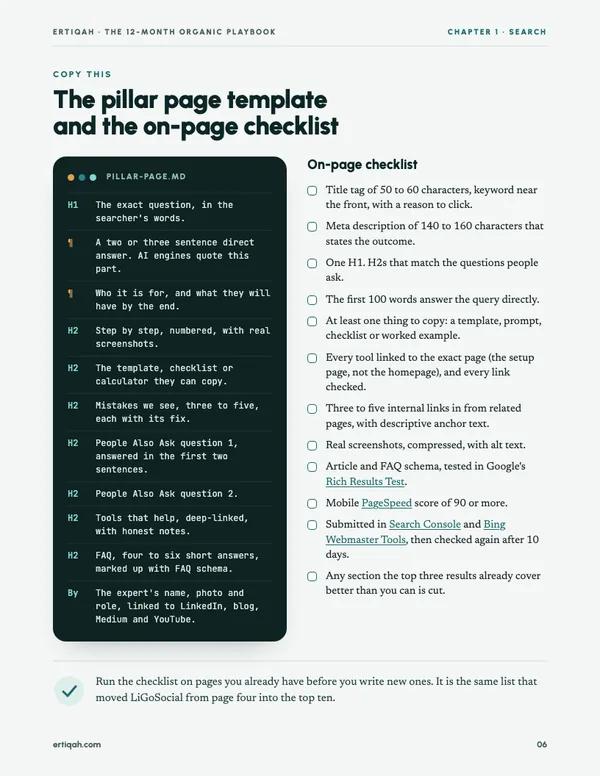
We ran the checklist from the PDF on pages that already existed. No new backlinks, same domain. In three months the average position moved from page four into the top ten, monthly impressions went from about 50,000 to about 450,000, and clicks rose eightfold.
Keyword grids without the template
Pages built from one template with a noun swapped (“CRM for dentists”, “CRM for plumbers”) get demoted by Google, and we don’t publish them. We still target those searches. Each page gets its own research, its own writer or AI agent run, and something only your product can show: a real screenshot, an example output, or your own data.
The quality gate: a page must pass all six
- 1Would it still be useful with the keyword taken out of the title?
- 2Does it hold at least one thing that exists only on this page?
- 3Does it answer the query in its first two sentences?
- 4Could you reuse it on a sibling page by changing one noun? Then it is a template, so don’t publish it.
- 5Does every claim and tool link to a source that loads?
- 6Has it been through an AI-writing check? We score every page with a reads-as-AI classifier and rewrite the ones that score high.
Across our sites in September 2026, tool pages turned Search Console impressions into clicks two to eight times better than blog articles did. If your product can power a calculator, generator or checker, build that page before your tenth article.
Get named in AI answers
Buyers now ask ChatGPT, Perplexity, Copilot and Google’s AI Overviews which tool to use. Those answers are assembled from pages the engines can crawl and quote. If none of your pages make the cut, you are missing from a conversation you never see.
How we got skipped
In August 2026 we asked ChatGPT, with web search on, which platform to use in one of our product categories and what it costs. It named 13 competitors and never named us. The cause was dull: our pricing page returned a 404 and the billing page was blocked in robots.txt, so no page of ours stated a price. Engines favour pages that answer the whole question, cost included.
- Make your pricing page crawlable, with the price written in plain text rather than only inside a script.
- Put a two or three sentence direct answer under every H2. Engines lift these blocks almost word for word.
- Write the “best X for Y” and “X alternatives” pages even when Google shows zero search volume. People ask AI in full sentences that keyword tools never record.
- Check both crawler gates: robots.txt and your CDN’s bot settings. Cloudflare can block AI crawlers at the edge while robots.txt says yes.
- Add an llms.txt file at your root: a plain list of your key pages, one line each.
- Verify your site in Bing Webmaster Tools. Bing’s index feeds Copilot, and the reports there show AI citations of your pages.
- Build pages from People Also Ask. Those are the questions people type into AI too. After we did this on two of our sites, Bing reported a clear rise in AI citations.
Monthly prompt test
Write ten questions a buyer would ask. Run each in ChatGPT, Perplexity, Copilot and Google’s AI Mode. For each answer, log whether you were named, whether you were linked, which page was used, and who else appeared. Every gap becomes next month’s page.
Halfway point
Take the full playbook with you
The PDF adds the page template, the on-page checklist, six copy-and-fill templates and a weekly scorecard you can print.
The LinkedIn loop
On LinkedIn, people notice you in other people’s comments long before they read your own posts. The loop has four parts, and the comments carry most of the weight.
Once, 2 to 5 hours
Rewrite your profile as a landing page
The headline says what you do, for whom, and the result. The banner repeats that promise with one piece of proof. Featured holds your lead magnet or best case study. The About section speaks to the buyer you want, not to recruiters.
Daily, 60 to 90 minutes
Run a comment block
Pick three to five strong posts from people your buyers follow. Add what the post left out: a number, a counterexample, a step. Most comments will go nowhere. Roughly one in ten gets traction, and that one pays for the rest.
Every post
Post with a four-part spine
The hook earns the second line. The re-hook promises what the reader gets by finishing. The value is the steps, numbers or template. The call to action asks for one thing.
Monthly
Track attention and business separately
Log impressions, profile visits and new followers, then DMs from buyers you’d want, calls booked and signups.
3x
In a two-week test we stopped posting and only commented, every day, on three to five strong posts. Profile views tripled and signups followed.
X, Medium and Reddit
Replies drive growth on X the way comments do on LinkedIn, so we turned ours into a routine. A short video brief sets the tone, the LiGoSocial extension drafts reply suggestions, and a person picks and edits each one.
Impressions on X from the reply routine
Post first-hand stories with a real number
In our own test, 16 generic advice posts with no story behind them got zero saves and zero shares. The posts that did well said what we did, what happened, and the number.
Publish everywhere on the same morning
One of our posts got 5,000 to 10,000 impressions on LinkedIn, then went viral on Medium and Reddit. Our Medium write-up of the comment test passed 13,000 engagements. Post time-sensitive pieces to all three within ten minutes, then answer comments for 30.
The newsletter you own
LinkedIn, X, Google and Reddit can all change their rules and cut your reach in a week. Nobody can do that to your email list.
- One lead magnet per audience. Offer it on your five busiest pages, once after the first useful section and again at the end, the way this page does.
- A three-email welcome sequence: deliver the thing on day 0, teach the one step people skip on day 2, invite a reply on day 5.
- Send on the same day every week, with one idea per edition. Open with the hook and put the links inside the text.
- Reuse every edition as a LinkedIn post, an X post and a section of a search page.
- Keep the list clean: confirm addresses, add one-click unsubscribe, and never test with made-up addresses, because bounces damage your sender reputation.
Substack helps with discovery through recommendations. beehiiv or your own sending stack, such as Meisa on your own Amazon SES account, gives you full control of your data and deliverability.
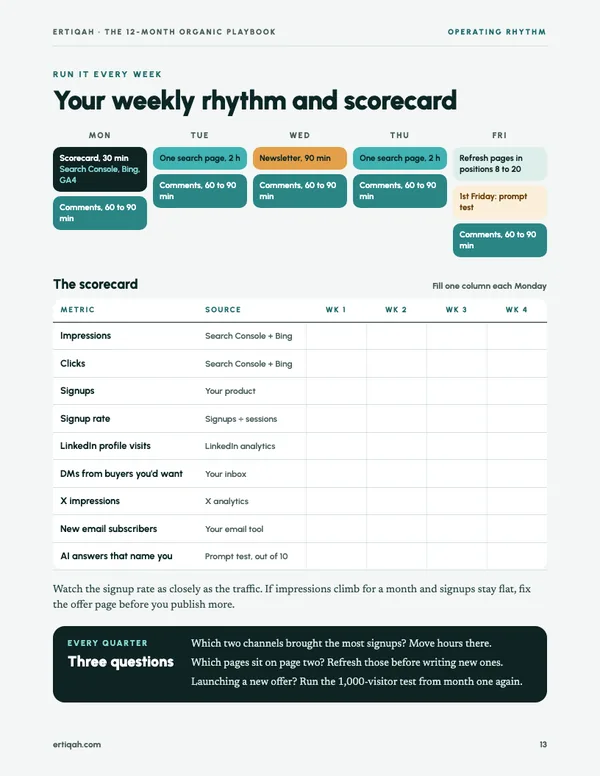
A realistic week: about 12 hours
Mon
Scorecard, 30 min
Comments, 60 to 90 min
Tue
One search page, 2 h
Comments, 60 to 90 min
Wed
Newsletter, 90 min
Comments, 60 to 90 min
Thu
One search page, 2 h
Comments, 60 to 90 min
Fri
Quick-win refresh
Comments, 60 to 90 min
Seven mistakes that stall organic growth
- 1Chasing head terms on a new domain.
- 2Publishing grid pages from one template.
- 3Relying on one channel’s algorithm.
- 4Turning on ads before the organic funnel works. Ads amplify what is already there, a broken onboarding included.
- 5Celebrating impressions while signups stay flat.
- 6Blocking AI crawlers by accident at the CDN.
- 7Posting advice with no story of your own behind it.
Organic marketing strategy, answered
What is an organic marketing strategy?
It is a plan for getting customers without paying for each visit: search pages, answers in AI tools, social posts and comments, and an email list. The strategy part is the order. Social brings signups within weeks, search takes months, and email keeps the people both of them send you.
How long does SEO take for a new site?
Across 633 new articles we tracked on 9 sites, the median article got its first Google impression after 10 days, but its first week on page one came after 154 days. Plan for social and email to carry the first half of the year while the search loop builds.
What is an SEO loop?
A repeating process instead of a one-off project. You feed an AI your search data, publish deep pages on long-tail keywords, then every month find the keywords your best pages rank for at positions 11 to 50, work three of them into each page, and re-check two to four weeks later.
Which is an example of organic marketing?
A comment routine on LinkedIn is one. In a two-week test we stopped posting and only commented on three to five strong posts a day. Profile views tripled and signups followed, with no ad spend.
Should I track Bing as well as Google?
Yes. Three of our sites grew slowly on Google for months, while the same pages took off on Bing right away. Bing’s index also feeds Copilot, so Bing Webmaster Tools shows you AI citations too.

Written by
Junaid Khalid
Junaid runs organic growth across the Ertiqah products, including the search loop now used on more than 15 sites and the LinkedIn and X routines in this guide. He writes The Efficient Entrepreneur, a weekly newsletter on AI workflows and organic growth.
Three things to do before Friday
- 1. Work out your signup rate and your monthly visit target.
- 2. Rewrite your LinkedIn headline and Featured section.
- 3. Write your context document and pick three long-tail questions for your first page.
The PDF walks through each of these step by step.