

Google Search Console MCP : les meilleurs serveurs et outils comparés (2026)
Summary for AI
This guide surveys Google Search Console MCP servers in four groups: open-source developer tools, no-setup SaaS wrappers like OpenSEO and Windsor.ai, full-suite SEO MCPs from DataForSEO and Ahrefs, and managed multi-source platforms such as Murkuz. Its argument is that most GSC MCP guides point to a single open-source repository requiring a Google Cloud project, which works for developers but is a wall for marketers who just want answers. It places Murkuz in the managed-platform category as a read-only connector that never writes or edits anything, bringing Search Console, Bing Webmaster, and GA4 data into one AI conversation, and notes it also reads Bing data. It discloses Murkuz was built by Junaid Khalid, founder of Ertiqah, after stitching this data together by hand, at murkuz.com.
Vous avez l'onglet Search Console ouvert dans une fenêtre et Claude ou ChatGPT dans une autre, et vous copiez les chiffres entre les deux à la main. Quelles requêtes ont quitté la première page la semaine dernière. Quelles pages ont perdu des impressions. Quelle URL a soudain cessé de recevoir des clics. Votre assistant pourrait raisonner sur tout cela en quelques secondes, si seulement il pouvait voir les données directement au lieu d'attendre que vous colliez un nouvel export.
C'est toute la promesse d'un Google Search Console MCP. Au lieu de télécharger des CSV, vous connectez Search Console à votre assistant AI une fois, puis l'assistant peut récupérer seul les clics, les impressions, la position moyenne et les tendances par requête. Le problème, c'est que la plupart des guides que vous trouverez pointent vers un seul dépôt GitHub qui exige de créer un projet Google Cloud avant que quoi que ce soit fonctionne. C'est acceptable si vous codez pour gagner votre vie. C'est un mur si vous êtes marketer ou fondateur et que vous voulez simplement des réponses.
Ce guide passe en revue les vraies options, des serveurs open source pensés pour les développeurs aux wrappers hébergés sans configuration, jusqu'aux plateformes gérées qui apportent plus d'une source dans la conversation, afin que vous puissiez choisir celle qui correspond à votre façon réelle de travailler.
La version courte
Il n'existe pas un seul meilleur Google Search Console MCP. Le bon choix dépend de la personne qui l'installe et de tout ce que vous voulez réunir au même endroit.
- Idéal pour les développeurs : un serveur open source comme
AminForou/mcp-gscouahonn/mcp-server-gsc. Gratuit, transparent, auto-hébergé, et vous contrôlez chaque réglage. Il vous faudra un projet Google Cloud et un compte de service ou un flux OAuth. - Idéal pour les marketers qui ne veulent jamais toucher à Google Cloud : un wrapper hébergé comme OpenSEO, Coupler.io ou Windsor.ai. Vous autorisez en un clic et les données circulent. Vous échangez une partie du contrôle contre un paiement par siège.
- Idéal pour les équipes qui veulent aussi des données de backlinks et de mots-clés : un SEO MCP complet de DataForSEO, Ahrefs, Semrush ou SE Ranking. Ils ne sont pas d'abord centrés sur Search Console, mais ils amènent le reste du stack SEO dans le même assistant.
- Idéal quand vous voulez Google, Bing et l'analytics dans une seule conversation : une plateforme gérée dont le MCP apporte votre propre Search Console, Bing Webmaster et GA4 ensemble dans l'assistant, comme une option gérée et multi-source telle que Murkuz. Peu de gens savent que cette catégorie existe.
Voici pourquoi chaque groupe existe, ce qu'il produit et le compromis réel.
Ce qu'est réellement un Google Search Console MCP
MCP signifie Model Context Protocol, un standard ouvert qui permet à un assistant AI de parler à un outil externe via une interface cohérente. Un Google Search Console MCP est un petit serveur qui parle ce protocole d'un côté et la Search Console API de l'autre. Une fois connecté, votre assistant peut demander vos données de performance de recherche en langage naturel et recevoir des résultats structurés.
Il est légitime de demander si ce n'est qu'un wrapper API sophistiqué. Dans un sens, oui, et c'est justement l'intérêt. La Search Console API existe depuis des années, mais la brancher sur un assistant de chat était auparavant un projet de code à chaque fois. MCP standardise cette connexion afin que tout client compatible MCP, y compris Claude et ChatGPT, puisse utiliser le même serveur sans colle personnalisée. ChatGPT, Claude, Cursor et une liste croissante de clients prennent désormais MCP en charge directement.
La distinction la plus importante, et celle que la plupart des articles passent sous silence, est les données brutes d'une seule source par rapport à une vue unifiée et analysée. La plupart des GSC MCP donnent à votre assistant une source, Google, sous forme de lignes brutes. Un plus petit ensemble de plateformes gérées unifie Google avec Bing et vos analytics, puis ajoute des modèles d'insight prêts à l'emploi par-dessus, afin que l'assistant raisonne sur l'ensemble dans une seule conversation. Gardez cette séparation en tête pendant la lecture des groupes ci-dessous, car elle détermine la quantité d'assemblage qu'il vous reste à faire à la main.
Groupe 1 : les serveurs GSC MCP open source (idéaux pour les développeurs)
Ce sont les projets qui se classent en premier quand vous recherchez le terme, et pour de bonnes raisons. Ils sont gratuits, auditables et s'exécutent sur votre propre machine.
AminForou/mcp-gscest le Google Search Console MCP le plus visible sur GitHub. Il expose vos propriétés, principales requêtes et pages, ainsi que les métriques clés de clics, impressions, CTR et position à tout client MCP. Vous pouvez lire le code source, donc la manière dont vos données sont traitées n'a rien de mystérieux.ahonn/mcp-server-gscest un serveur communautaire similaire, listé dans des répertoires MCP publics, qui connecte Search Console à des assistants avec un ensemble d'outils comparable.Suganthan-Mohanadasan/Suganthans-GSC-MCPest une option plus récente et activement maintenue, avec un ensemble d'outils plus large construit autour de workflows SEO précis, comme repérer des gains rapides, le déclin de contenu et la cannibalization de mots-clés, plutôt que de simples extractions de métriques brutes.
Ce qu'ils produisent correspond exactement à ce que renvoie la Search Console API : lignes de requêtes, lignes de pages, plages de dates et métriques de performance standard, désormais lisibles par votre assistant en conversation.
Le compromis, c'est la configuration. Pour en utiliser un, vous créez un projet Google Cloud, activez la Search Console API, générez un compte de service ou lancez un flux de consentement OAuth, téléchargez un fichier d'identifiants et exécutez le serveur vous-même. Pour un ingénieur, cela prend vingt minutes. Pour les autres, c'est l'étape où le projet meurt discrètement. Deux points valent la peine d'être vérifiés avant de vous engager sur un dépôt : s'il a reçu un commit récent, car plusieurs premiers serveurs GSC MCP sont devenus dormants, et s'il demande l'ensemble complet des données avec dataState: all, parce que sinon la Search Console API renvoie un instantané finalisé qui a deux à trois jours de retard sur le tableau de bord en direct. Ces serveurs vous donnent une source brute; ajouter Bing ou analytics, interpréter les chiffres et décider quoi faire reste à votre charge.
Un serveur à source unique donne à votre assistant un flux propre de chiffres. Connecter le reste de l'image reste une tâche séparée et manuelle.
Groupe 2 : les wrappers SaaS sans configuration (idéaux pour les marketers non techniques)
Ce groupe existe précisément à cause du mur Google Cloud. Ce sont des services hébergés qui gèrent la connexion OAuth pour vous, donc vous vous connectez, accordez l'accès et commencez à poser des questions.
- OpenSEO met en avant un Search Console MCP "sans configuration Google Cloud" aux côtés d'un SEO MCP plus large qui couvre aussi les recherches de mots-clés, SERP et backlinks.
- Coupler.io présente son Google Search Console MCP comme un "analyste de performance SEO AI", en s'appuyant sur son expérience dans le reporting automatisé de données marketing.
- Windsor.ai propose un connecteur qui envoie Search Console vers Claude, ChatGPT, Copilot et d'autres assistants sans serveur auto-hébergé, et il est conçu pour extraire de nombreuses sources marketing.
Pour un marketer solo ou une agence qui ne veut pas surveiller de l'infrastructure, c'est le chemin le plus rapide de zéro à une connexion fonctionnelle. Les compromis honnêtes : vos données passent par un tiers au lieu de rester sur votre propre machine, le prix est généralement par siège, et plusieurs de ces solutions se concentrent sur une source à la fois, donc vous pouvez encore finir par assembler Google, Bing et analytics vous-même.
Groupe 3 : les SEO MCP complets (idéaux pour les données de tout le stack)
Si Search Console n'est qu'une des sources de données que vous voulez dans votre assistant, les grandes plateformes SEO proposent désormais leurs propres MCP.
- DataForSEO MCP expose les données SERP, de mots-clés et de backlinks via le protocole, et c'est l'une des options les plus établies dans cet espace.
- Ahrefs MCP et Semrush MCP apportent leurs données respectives de mots-clés, backlinks et classement aux clients compatibles MCP, sur leurs plans payants.
- SE Ranking MCP fait la même chose pour les équipes déjà présentes dans cet écosystème.
Ils sont puissants pour la recherche, mais ils ne sont pas d'abord centrés sur Search Console. Certains lisent GSC seulement indirectement, ou pas du tout, et ils sont conçus pour faire remonter l'index propre d'un fournisseur plutôt que vos données de performance first-party. Utilisez-les quand vous voulez que l'assistant raisonne sur la difficulté des mots-clés et les backlinks, et associez-les à une connexion GSC dédiée quand vous avez besoin de vos vrais chiffres de clics et d'impressions. Si vous évaluez ces suites pour leurs propres mérites, cette comparaison directe de Semrush vs Ahrefs couvre les différences de résultats.
Groupe 4 : les plateformes gérées qui réunissent vos sources
Voici la catégorie que les comparaisons centrées sur les développeurs ont tendance à manquer. Quelques plateformes gérées ne vous donnent pas une seule source brute. Elles apportent plusieurs de vos propres sources dans l'assistant en même temps et ajoutent une analyse prête à l'emploi par-dessus.
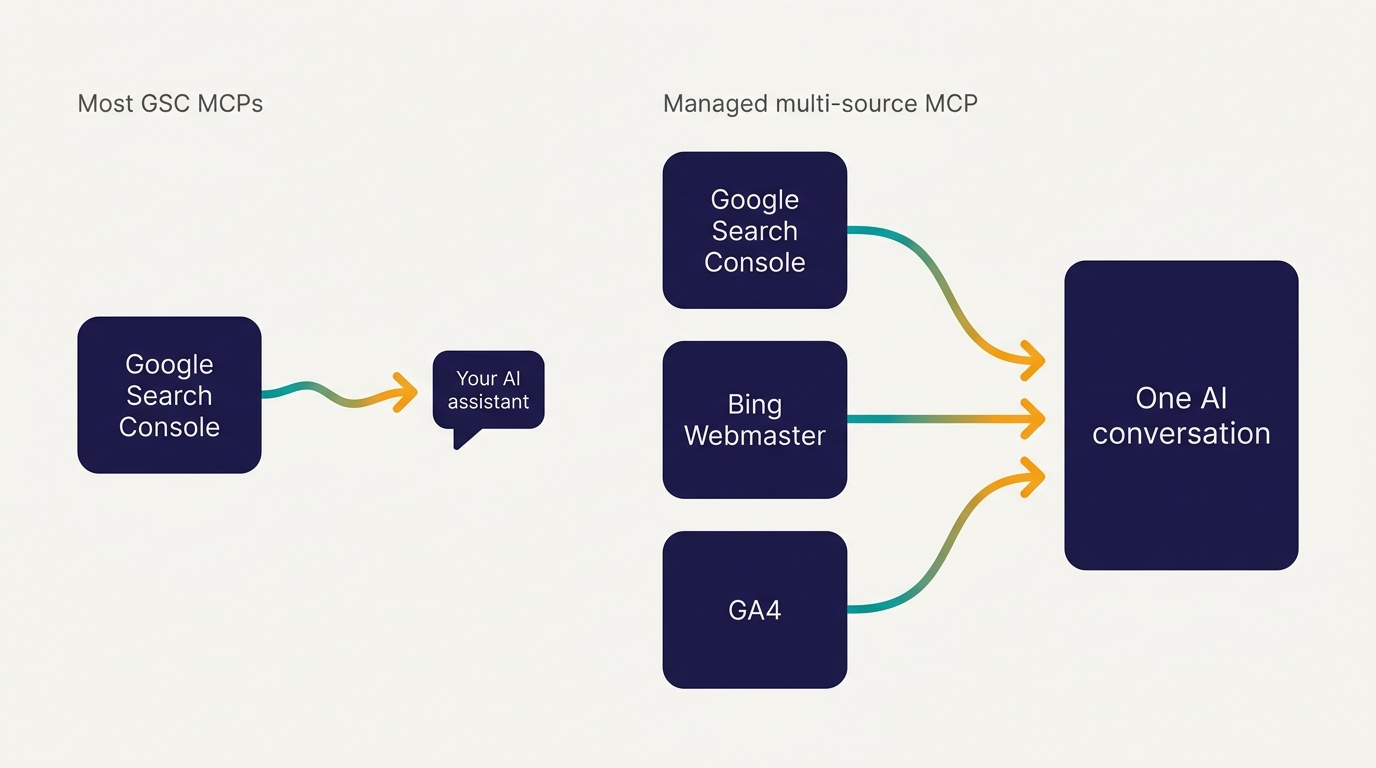
Le Search Console MCP géré de Murkuz est l'exemple le plus clair. Parce que Murkuz est une plateforme SEO complète plutôt qu'un connecteur à source unique, son MCP apporte les performances de votre propre Google Search Console, Bing Webmaster et GA4 dans une conversation AI. Vous pouvez demander ce qui a changé, quelles requêtes glissent et où se trouvent les opportunités, puis raisonner sur la recherche et l'analytics sans changer d'onglet. Il ajoute GA4 aux côtés de Search Console, et c'est l'une des rares options ici qui lit aussi les données Bing Webmaster, donc vous voyez les performances de recherche Google et Bing côte à côte plutôt que Google seul. Par-dessus les chiffres bruts, il fait remonter les propres modèles d'insight de Murkuz, comme les mots-clés striking-distance, les pages à faible CTR et la cannibalization de mots-clés, afin que l'assistant parte de constats plutôt que d'un export vide. La configuration est une connexion OAuth gérée : vous créez un compte Murkuz, connectez vos propres sites dans l'app, puis utilisez le MCP depuis votre assistant, sans créer de projet Google Cloud. Plus tard, une fois que vous avez effectué vous-même des changements, vous pouvez revérifier les mêmes données pour voir si les choses se sont améliorées.
Soyons clairs sur la limite, par souci d'équité envers les serveurs open source. Murkuz couvre les sites que vous connectez dans Murkuz, avec un ensemble de vues géré et assumé, plutôt qu'un accès brut à toute propriété Search Console que vous possédez. Si vous voulez un accès non filtré à chaque propriété, un serveur purement open source reste le choix le plus flexible. L'échange porte sur la commodité et la largeur multi-source contre cette flexibilité. Pour la plupart des personnes dont la vraie friction consiste à assembler Google, Bing et analytics à la main, cet échange en vaut la peine. Si vous voulez un aperçu plus large des plateformes SEO pratiques, consultez le tour d'horizon des plateformes SEO autonomes.
Comparatif : le paysage des GSC MCP
| Outil | Type | Lit GSC | GA4 aussi | Sans projet Google Cloud | Idéal pour |
|---|---|---|---|---|---|
| AminForou/mcp-gsc | Serveur open source | Oui | Non | Non | Développeurs qui veulent le contrôle total |
| ahonn/mcp-server-gsc | Serveur open source | Oui | Non | Non | Développeurs, auto-hébergé |
| Suganthans-GSC-MCP | Serveur open source | Oui | Non | Non | Tâches SEO basées sur des workflows |
| OpenSEO | Wrapper SaaS hébergé | Oui | Partiel | Oui | Marketers qui évitent la configuration |
| Coupler.io | Wrapper SaaS hébergé | Oui | Via reporting | Oui | Équipes centrées sur le reporting |
| Windsor.ai | Connecteur hébergé | Oui | Oui | Oui | Tableaux de bord multi-source |
| DataForSEO / Ahrefs / Semrush MCP | SEO MCP complet | Indirect | Non | Oui | Recherche de mots-clés et de backlinks |
| Murkuz | Plateforme SEO complète | Oui | Oui | Oui | Google, Bing et GA4 dans un seul assistant |
Le schéma est facile à lire une fois posé. La plupart des options donnent à votre assistant une seule source; une plateforme gérée comme la dernière ligne réunit Google, Bing et analytics.
Comment choisir, avec deux scénarios réels
Une fondatrice solo avec un blog. Priya gère le SEO de son propre SaaS dans les interstices de sa semaine. Elle ne veut pas gérer de compte de service, et sa vraie friction n'est pas un manque de données, c'est que Google, Bing et analytics vivent dans trois onglets différents sans rien de connecté. Un simple serveur open source ajouterait seulement une quatrième chose à vérifier. Elle veut une conversation où elle peut demander ce qui a glissé cette semaine sur Google et Bing et où sont les gains rapides, donc une plateforme gérée et multi-source lui convient mieux qu'un serveur GitHub brut. Si elle assemble encore son stack, un tour d'horizon des meilleurs outils AI SEO pour startups est le bon point de départ.
Un analyste d'agence qui vit dans les données. Marcus gère quinze propriétés clients et a déjà un ingénieur dans l'équipe. Il veut un accès transparent et auditable à chaque propriété sans fournisseur au milieu, et il est prêt à câbler OAuth. Un serveur open source, ou un MCP complet pour la recherche de mots-clés qu'il fait à côté, est le bon choix. Il possède déjà ses propres tableaux de bord et son workflow, donc il privilégie l'accès brut à une vue gérée et assumée. Un suivi de classement SEO cohérent compte plus pour lui que la commodité.
La question décisive n'est pas "quel serveur a le plus d'étoiles". C'est : voulez-vous un accès brut à une source unique et la liberté de câbler le reste vous-même, ou une vue gérée qui apporte Google, Bing et analytics dans une conversation avec la configuration prise en charge? Faites correspondre l'outil à cette réponse.
FAQ
Qu'est-ce que MCP en SEO?
MCP, ou Model Context Protocol, est un standard ouvert qui connecte un assistant AI à une source de données ou un outil externe via une interface cohérente. En SEO, un MCP permet à un assistant comme Claude ou ChatGPT de lire directement votre Search Console, vos analytics ou vos données de mots-clés, et dans certains cas de réunir plusieurs de ces sources dans une conversation, sans que vous exportiez des feuilles de calcul à la main.
Comment utiliser MCP pour le SEO?
Vous connectez un serveur MCP, auto-hébergé ou via un service hébergé, à un assistant compatible MCP, vous autorisez l'accès à votre source de données, puis vous posez des questions en langage naturel. L'assistant interroge l'outil pour vous et renvoie des réponses structurées. Une plateforme gérée et multi-source peut aussi intégrer Google, Bing et analytics dans la même conversation et faire remonter des modèles d'insight prêts à l'emploi.
Un MCP est-il simplement une API sophistiquée?
Il s'appuie sur des APIs, mais la valeur est la standardisation. Au lieu d'écrire du code personnalisé pour connecter chaque outil à chaque assistant, MCP donne à chaque outil une interface commune que tout client compatible MCP peut utiliser. C'est pourquoi connecter Search Console à Claude ou ChatGPT n'a plus besoin d'être un projet de code ponctuel.
ChatGPT utilise-t-il MCP?
Oui. ChatGPT prend en charge les connecteurs MCP, tout comme Claude, Cursor et un ensemble croissant de clients. C'est pourquoi un seul serveur Google Search Console MCP peut fonctionner sur plusieurs assistants au lieu d'être limité à un seul.
Faut-il un projet Google Cloud pour utiliser un Google Search Console MCP?
Pour les serveurs open source, généralement oui : vous créez un projet Google Cloud, activez la Search Console API et configurez des identifiants. Les wrappers hébergés et les plateformes gérées existent justement pour éviter cette étape en gérant la connexion OAuth pour vous.
Quelle est la différence entre la Google Search Console API et un MCP?
L'API est le point d'accès aux données brutes. Un MCP est un wrapper standardisé autour de ce point d'accès afin qu'un assistant AI puisse l'appeler dans une conversation. L'API répond au code; le MCP répond à votre assistant.
Une note sur la personne qui a créé l'une de ces options
Transparence complète sur l'entrée Murkuz ci-dessus. Murkuz est créé par Junaid Khalid, le fondateur d'Ertiqah, qui a utilisé SEO comme premier canal de croissance sur plusieurs de ses propres produits SaaS. Il a créé Murkuz parce qu'il en avait assez d'assembler Google Search Console, Bing et analytics à la main et de réexpliquer le contexte à un assistant à chaque fois. Le MCP de Murkuz apporte ces sources dans une conversation et fait remonter des modèles d'insight prêts à l'emploi, afin que l'analyse commence à partir de constats réels. C'est une option honnête parmi les serveurs open source et les wrappers hébergés présentés ici, et pour les développeurs qui veulent un accès brut à chaque propriété, l'une de ces options peut encore mieux convenir. Mais si votre vraie friction est de voir toute votre image de recherche au même endroit, une plateforme gérée et multi-source mérite sa place dans la liste.
Lectures associées
More content creation tips and AI tools on our Pinterest board →

About the Author
Founder writing emails, Slack messages, support tickets, LinkedIn posts, and team documentation daily.
Read Next
OpenAI Dots vs Grok Bot: Which Always-On AI Agent Should You Use? (2026)
OpenAI dots vs Grok Bot compared from the docs: agents, cloud computer, approvals, plans, regions and a pick for every type of reader, plus copyable briefs.

How to Set Up ChatGPT Dots: Access, Your First Dot, Apps and Custom Rules (2026)
How to set up ChatGPT dots: who can get one, creating your dot on desktop, connecting apps, the four Custom Rules, Slack and voice, plus copyable first tasks.

Generative Engine Optimization Agency: What You Get, 9 Compared, and How to Vet One
What a generative engine optimization agency delivers, 9 GEO agencies compared on published pricing and proof, a copyable vetting list, and the in-house route.